Telegram Notifications
The Telegram Notifications section lets you choose which Futures events should be sent to Telegram.
Use this section when you want to stay informed about trading activity without constantly watching the platform interface.
Why this section is useful
In Futures trading, important events can happen while you are away from the screen.
Telegram Notifications help you follow those events outside the platform. Instead of checking the Terminal all the time, you can choose which messages should be delivered to Telegram and which ones are not necessary for your workflow.
Connect Telegram first
Before using this section, Telegram must already be connected to your Firedrake profile.
If Telegram is not connected yet, the page shows a warning and directs you to the connection step.
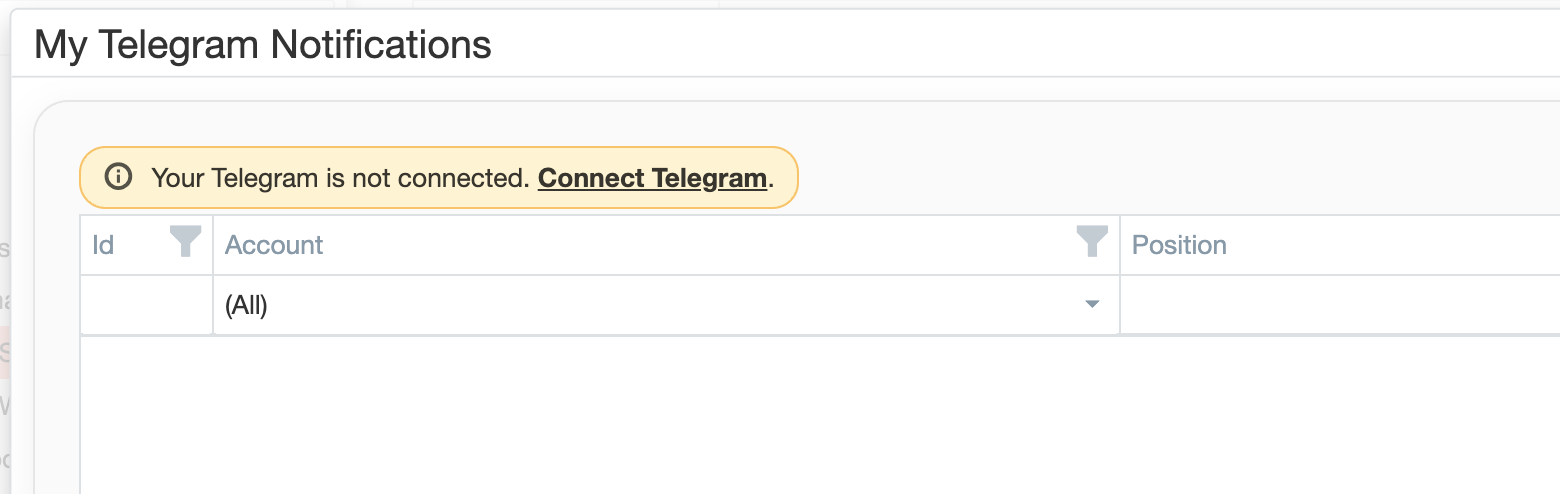
Notification settings only make sense after the platform already knows where to send messages.
Notification profiles by account
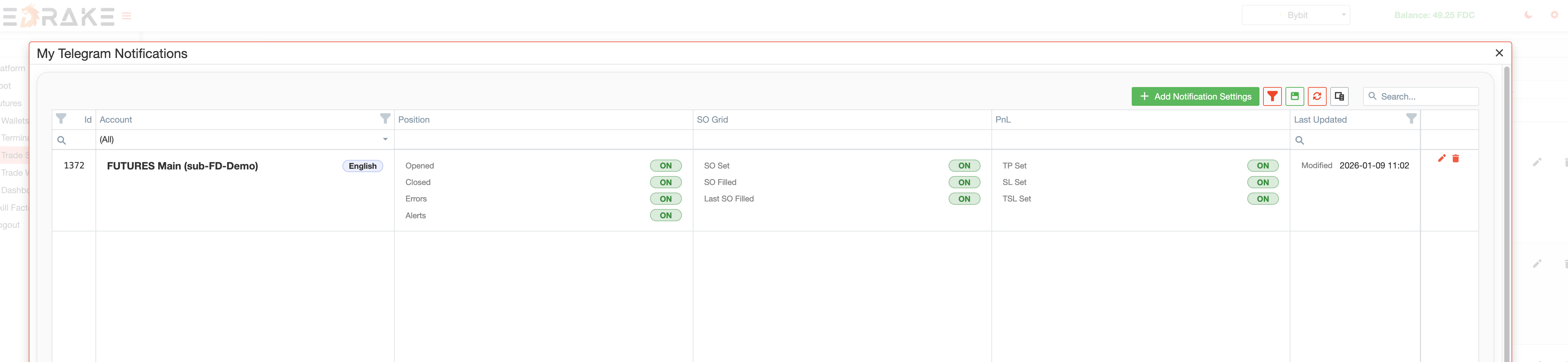
Notification settings are configured separately for each account.
You can create one notification profile for one Futures account and a different profile for another account, instead of using one global setup for everything.
This works well when:
- you use more than one account;
- different accounts follow different strategies;
- one account needs more detailed notifications, while another only needs the most important ones.
Notification language
Each notification profile includes a language setting.
You can choose which language Telegram messages should use for that account.
This supports teams or users who prefer different notification languages.
Notification categories
The section includes several groups of notifications.

Position notifications
The Position group covers the main events in a trade lifecycle.
This group includes notifications such as:
- Opened — when a position is opened;
- Closed — when a position is closed;
- Errors — when something goes wrong and needs attention;
- Alerts — important trade-related warnings that do not necessarily mean the trade has failed.
Use this group if you want to follow the main trade status without receiving every smaller operational update.
SO Grid notifications
The SO Grid group covers safety-order activity.
It includes notifications such as:
- SO Set — when the safety-order grid is placed;
- SO Filled — when a safety order is filled;
- Last SO Filled — when the last safety order in the grid is filled.
Use this group if you want to monitor how averaging and grid activity develop after a position has been opened.
PnL notifications
The PnL group covers notifications related to position protection and exit setup.
It includes notifications such as:
- TP Set — when Take Profit is set;
- SL Set — when Stop Loss is set;
- TSL Set — when Trailing Stop Loss is set.
Use this group when you want visibility into how position protection and exit settings are being configured.
Why selective notifications work better
Usually it is better to enable only the notifications that are actually useful.
If everything is enabled at once, Telegram can quickly become too noisy. A focused setup is usually more practical:
- use Position notifications for the main trade lifecycle;
- add SO Grid notifications if you want more visibility into averaging and grid activity;
- use PnL notifications if you want to track protection and exit setup events.
A focused setup keeps the notification flow easier to read in real trading.
How this section fits into the Futures workflow
Telegram Notifications support the rest of the Futures workflow.
It works together with:
- Trade Strategies — when you want strategy-driven activity to be reflected in Telegram;
- Trade Web-Hooks — when external signals can lead to account activity and you want to be notified about it;
- Terminal — where trades, bots, and positions are managed inside the platform.
The section extends the Futures workflow beyond the browser.
Typical workflow
A typical workflow looks like this:
- Connect Telegram to your Firedrake profile.
- Open Telegram Notifications.
- Create a notification profile for the account you want to monitor.
- Select the preferred language.
- Enable only the categories you really want to receive.
- Save the profile.
- Follow Futures activity through Telegram while continuing to manage trading inside the platform.
Summary
Use Telegram Notifications when you want important Futures events to reach you outside the platform interface.
This section helps you stay informed about account activity, position events, safety-order activity, and updates related to position protection.