Bot Settings
The Bot Settings section is used to define how a futures trade should be opened and managed after entry.
Open this section when you want to prepare a reusable trading profile instead of configuring the same parameters again inside every strategy or webhook.
Here you define things such as:
- the size of the first order;
- leverage and position side;
- take profit and stop loss settings;
- the safety-order structure;
- how the trade should be managed after it opens.
Why Bot Settings matter
Bot Settings are one of the core sections in Futures.
They are separated into their own section because the same trading setup can be reused in different places. This makes configuration easier to manage and helps keep trading logic consistent.
Instead of rebuilding the same trade parameters every time, users can create a bot-setting profile once and reuse it where needed.
What users see in this section
The page shows a list of saved bot-setting profiles.
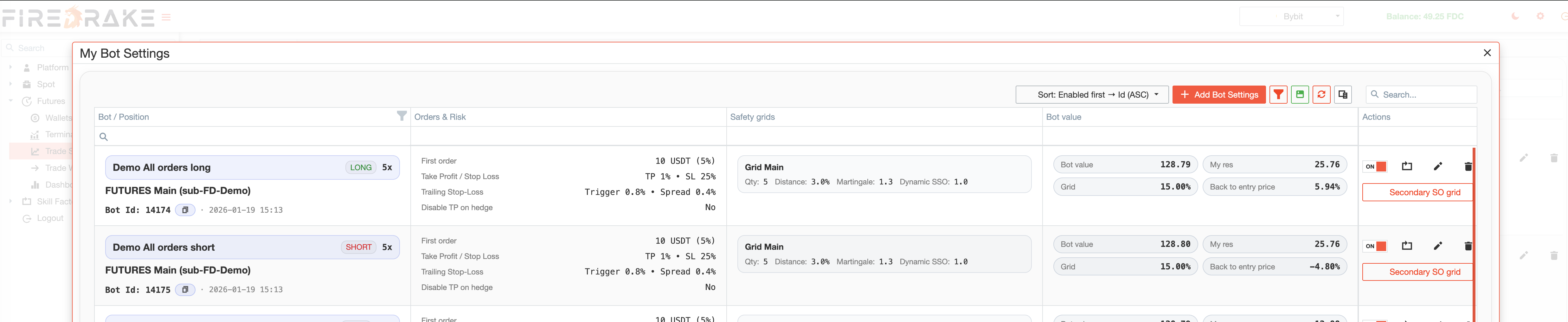
Each profile is a ready-to-use trading setup for a specific account and position side.
The list is useful when you want to:
- compare prepared profiles;
- find the right configuration for a strategy or webhook;
- check which profiles are enabled;
- maintain a library of reusable trading setups.
Like other major Firedrake tables, this section also supports search, sorting, filtering, and layout saving.
Main actions
This section is used for reviewing profiles and managing them.
Users can:
- create a new bot-setting profile;
- edit an existing one;
- clone a profile to create a similar variation faster;
- enable or disable a profile;
- delete profiles that are no longer needed.
The section supports both initial setup and ongoing refinement of trading profiles.
General settings
At the top level, Bot Settings begin with the general profile parameters.
This usually includes:
- the account the profile belongs to;
- the profile name;
- whether the profile is for long or short positions;
- whether the profile is enabled and available for use.
These settings help keep configurations organized and easy to reuse.
Position Details
The Position Details area defines the basic structure of the trade.
This includes settings such as:
- position side;
- leverage;
- margin type;
- first order amount.
This area is important because it defines how the trade starts. Even if two strategies work with similar market conditions, they may still require different position settings.
Take Profit and Stop Loss
The Take Profit / Stop Loss settings define the core exit logic of the trade.
This is where users decide how profits should be taken and how risk should be limited if price moves in the wrong direction.
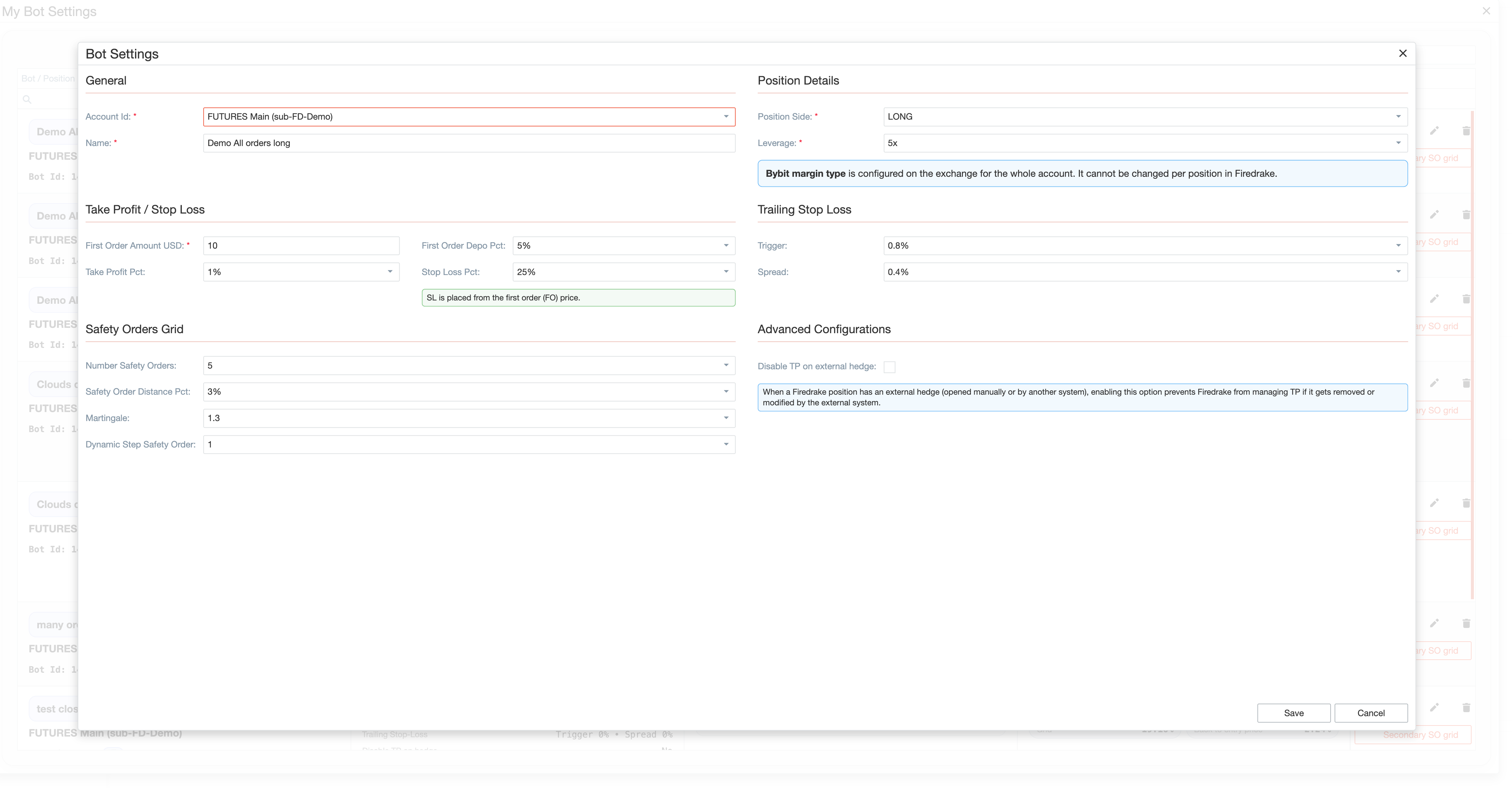
This is one of the most important parts of the profile because it directly affects how the trade will be managed after entry.
Trailing Stop Loss
The Trailing Stop Loss area is used when users want the protective logic to adjust dynamically as price moves.
Here you define:
- when trailing stop behavior should activate;
- how much distance should be maintained once it is active.
Use it when you want to protect part of the move while still giving the trade room to continue.
Safety Orders Grid
The Safety Orders Grid defines how the trade should be supported if price moves against the original entry.
Use this section when you want a structured averaging approach instead of a single entry order.
A bot-setting profile can include:
- the number of safety orders;
- the spacing between them;
- grid scaling logic;
- the overall capital distribution structure within the trade.
This area affects how flexible or aggressive the trade becomes after the first entry.
Secondary SO Grid
One of the advanced Bot Settings features is the ability to use Secondary SO Grid configurations.
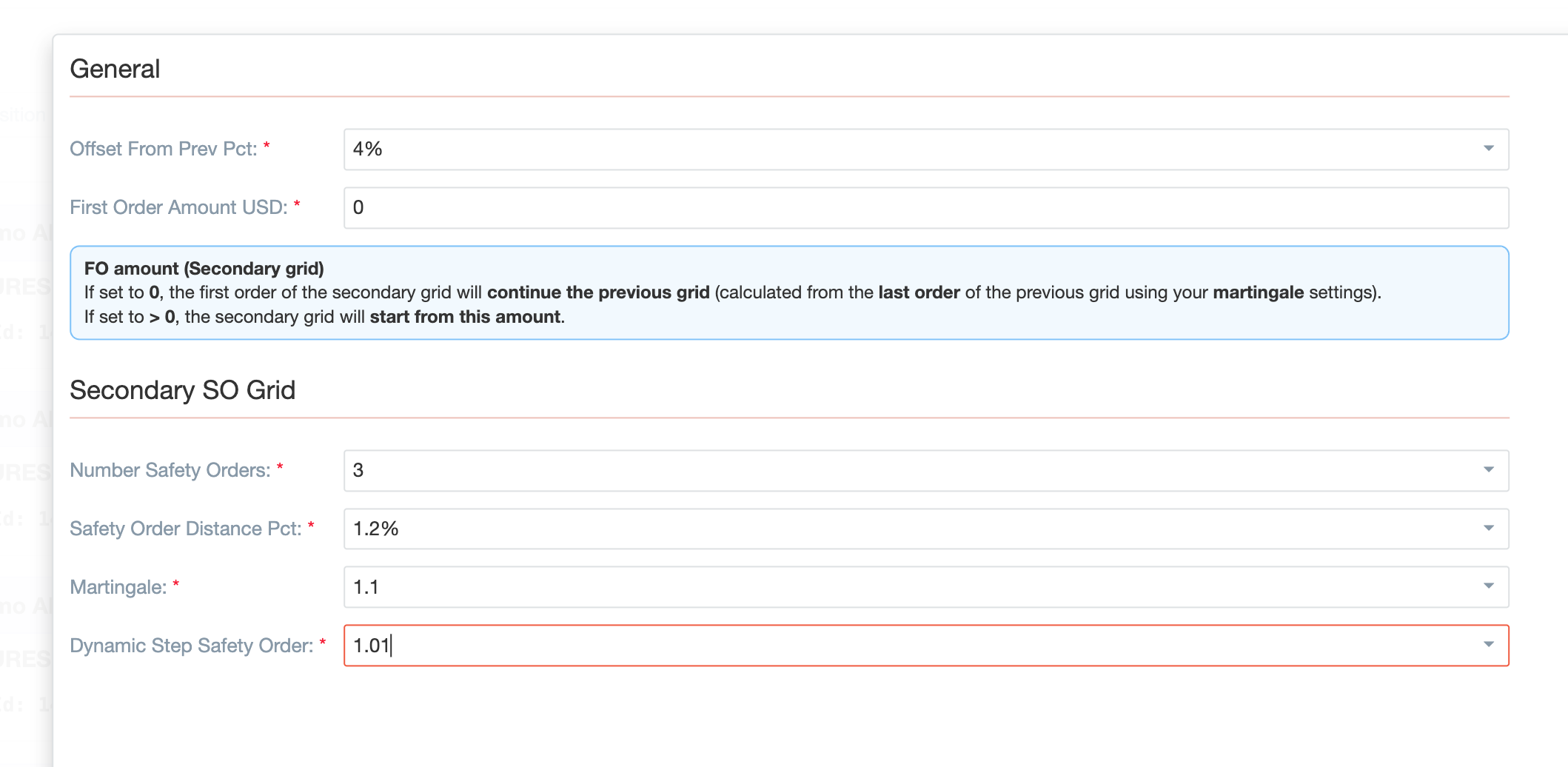
You can add additional safety-order grids with their own parameters instead of relying on a single grid structure.
Use this when one averaging pattern is not enough for the price behavior you want to prepare for.
Secondary grids are especially useful when you want:
- more flexibility in position support;
- different order density at different stages of price movement;
- a more customized structure for handling deeper pullbacks.
This advanced feature gives users more control over how the position is supported.
Advanced configurations
Bot Settings also include additional parameters for more specialized scenarios.
These are fine-tuning options that affect trade behavior in less typical situations.
A practical approach is:
- first configure the core position, TP, SL, and safety-order settings;
- then move to advanced options only when there is a clear reason to use them.
One example is the external hedge-related option. Treat it as a specialized setting for users who already have a clear hedge process, rather than as something that should be enabled by default.
Understanding the final bot configuration
When users review a bot-setting profile, they are evaluating the overall trade structure rather than separate numbers.
Depending on the setup, this may include things such as:
- how much capital the bot may use overall;
- how large the grid may become;
- how far price may need to return for the position to move closer to break-even.
These values help users compare profiles and understand the practical differences between them.
This means:
- bot value helps estimate the total amount of capital that may be used in the setup;
- grid size shows how wide the grid may become if price moves against the entry;
- back to entry helps show how far price may need to return for the position to move closer to break-even.
Where Bot Settings are used
Bot Settings are used across different parts of the Futures section.
They are especially important here:
- Trade Strategies — strategies use Bot Settings to define how trades should be opened and managed;
- Trade Web-Hooks — webhooks use Bot Settings to define what should happen after an external signal is received;
- Grid Calculator — the calculator can prepare a result and pass it into Bot Settings through the Create Bot flow;
- Futures Terminal — once a trade is open, users may still view and adjust part of the same logic there.
Bot Settings serve as a reusable set of trade parameters within the Futures module.
Typical workflow
A typical workflow in this section looks like this:
- Create a bot-setting profile for the required account and position side.
- Define the Position Details, such as leverage and first order.
- Add take profit, stop loss, and trailing stop.
- Configure the main safety-order grid.
- Add secondary grids if a more advanced structure is needed.
- Save the profile.
- Reuse it later in Trade Strategies, Trade Web-Hooks, or Grid Calculator-related flows.
Summary
Use Bot Settings when you want to define in advance how a futures trade should be opened and managed after entry.
This section brings together the main trade parameters: order size, leverage, exit logic, trailing stop, and safety-order structure.
For users who want a more consistent and reusable trading profile, this is one of the key sections in the platform.