Active Bots
The Active Bots section is the Futures Bots tab inside the Futures Terminal.
Use it when you want to monitor deals that are currently being managed by bots and when you need to adjust management settings after a position is already open.
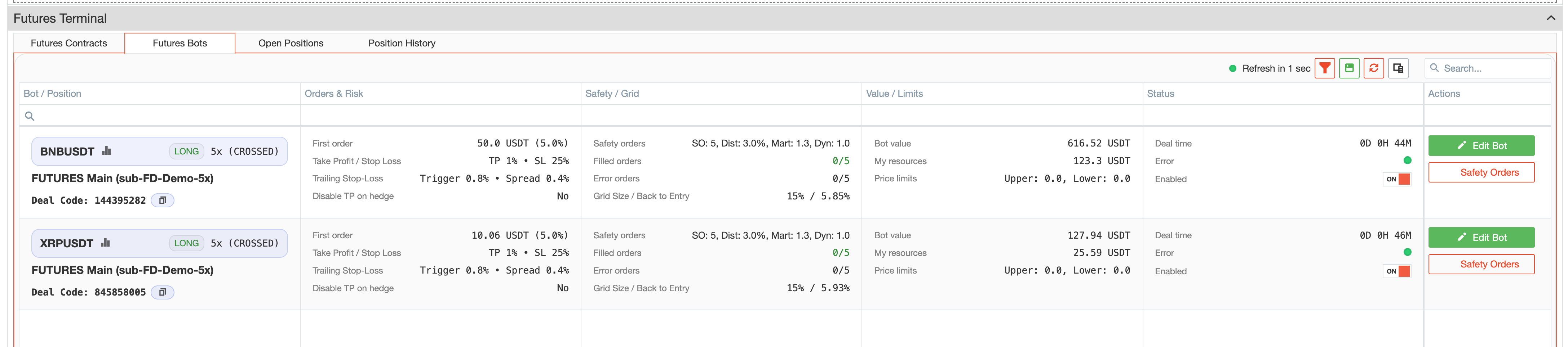
What the tab shows
This tab is built around active bot-managed deals.
At a practical level, it helps you review information such as:
- the contract and direction of the deal;
- the connected account;
- leverage and related deal details;
- deal code;
- first-order information;
- take profit, stop loss, and trailing stop parameters;
- safety-order structure;
- grid and back-to-entry related values;
- timing, warnings, and possible errors;
- whether the bot is currently enabled.
This makes the tab suitable for monitoring and everyday control of already running deals.
Editing an active bot-managed deal
One of the main functions of this tab is the ability to edit a running deal.
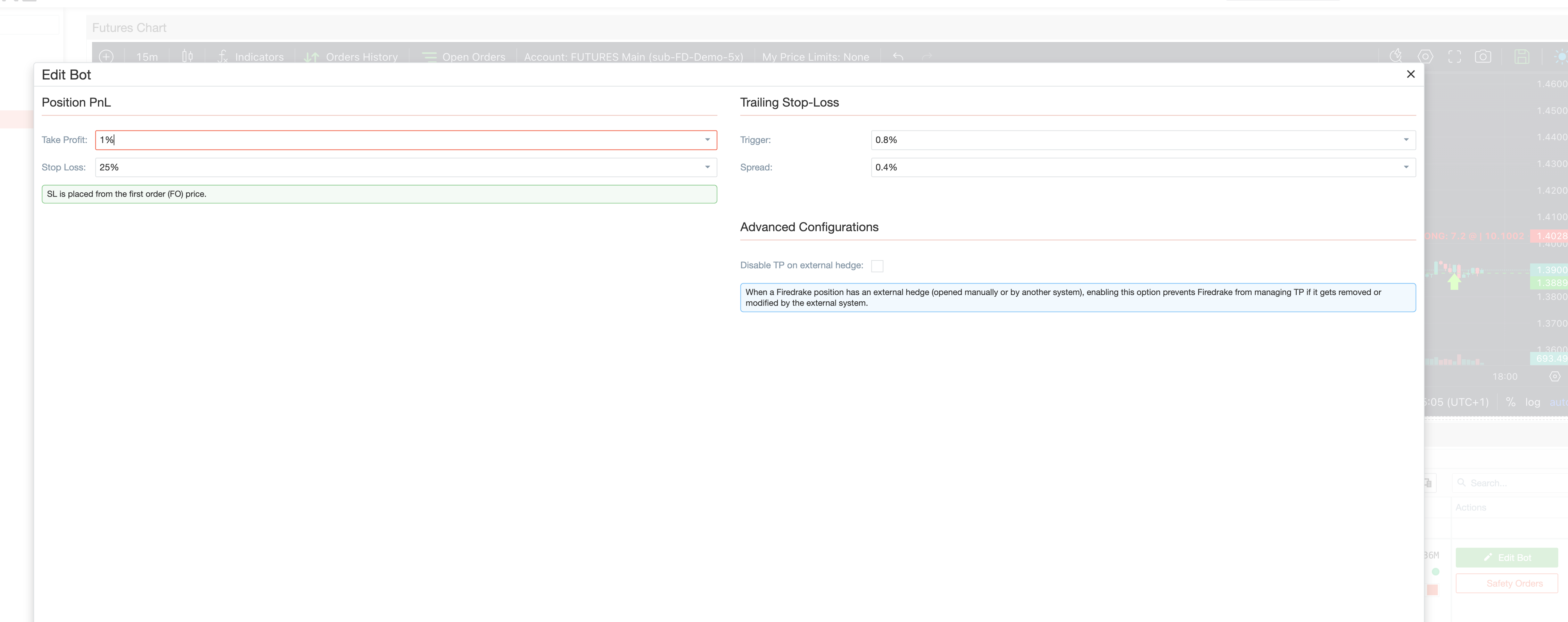
From the edit view, users can adjust key management settings such as:
- Take Profit
- Stop Loss
- Trailing Stop trigger
- Trailing Stop spread
- Disable TP on hedge
This is useful when you want to adapt an already open deal to updated conditions without rebuilding the full setup from scratch.
Safety Orders
For each active deal, you can also open a separate Safety Orders view.
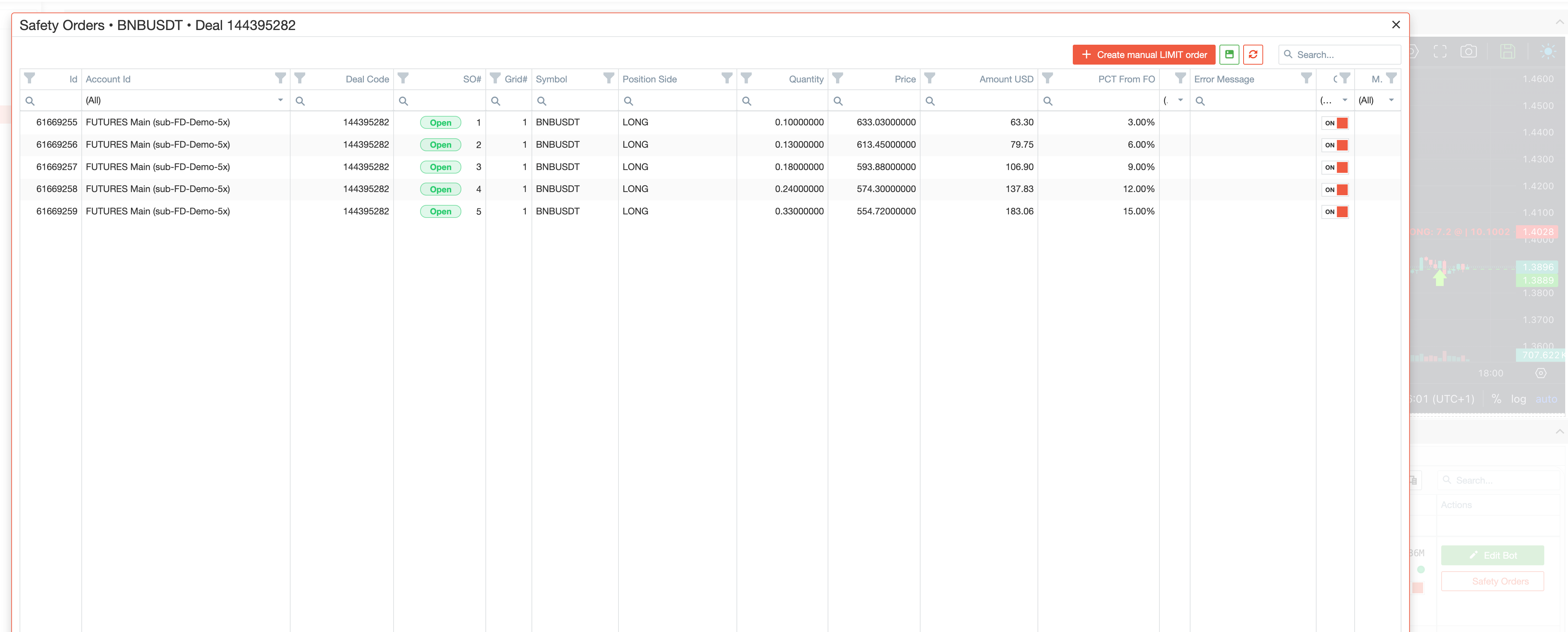
This view is used to review the non-zero safety orders linked to the deal.
It helps you:
- inspect the current safety-order structure;
- see which safety orders are already filled;
- review the status of individual orders;
- control whether a specific safety order remains under bot management.
Each listed safety order includes its own On/Off management switch. This is useful when you want more selective control over how the bot continues to handle parts of the order structure.
Manual Safety Order
The Safety Orders view also supports adding a manual safety order.

This manual order is created as a limit order.
When adding it, users can define:
- the order price;
- either the USD amount;
- or the coin quantity.
This is helpful when you want to strengthen or fine-tune an already open deal with an additional manually placed order.
Enabling and disabling the bot
The whole active bot also has its own enabled switch in the list.
This makes the tab important for adjusting deal parameters and controlling whether the bot remains active for that deal.
When using this control, keep in mind that the practical purpose of the tab is to manage an active bot-controlled position. If you disable bot control, the position may require more manual attention.
Typical workflow
A common workflow in Active Bots looks like this:
- Open the Futures Bots tab inside the Terminal.
- Find the active deal you want to review.
- Check the core deal parameters in the list.
- Open Edit Bot if you need to adjust TP, SL, or TSL settings.
- Open Safety Orders if you want to inspect the existing order structure.
- Add a Manual Safety Order if you want to strengthen the current setup.
- Use the On/Off management switch for a specific safety order when you need more selective control.
- Use the bot enabled switch when you need to control whether the bot remains active for that deal.
Summary
Use Active Bots when you want to:
- monitor active bot-managed deals;
- adjust TP, SL, and TSL-related settings after entry;
- review the safety-order structure of a running deal;
- add a manual safety order;
- control whether a specific safety order or the whole bot remains enabled.