Partner Hub
The Partner Hub lives in Skill Factory → Partner Hub. It is a curated marketplace of tools and services built by Firedrake partners — backtesters, analytics, bots, educational products and more. Some are free; others are paid in FDC (the platform's internal credits).
You browse the catalogue, get or buy a product in a couple of clicks, and — for paid products — manage your subscription right from the page. Everything here is curated by the Firedrake team, but the products themselves are made and run by third-party partners.
What you see on a product card
Each product is shown as a card. Depending on the product, a card may include:
- Card number (#) — a stable identifier for the product.
- Free / Paid badge.
- Product type — for example Backtester, Analytics or Bot (set by the partner).
- Title and author — the product name and who it's from (the partner's handle, or Trader #<id>).
- Short description.
- Price — either Free, a one-time FDC cost, or a recurring price shown per period (for example
200 FDC / year). - Owned badge and subscription state — once you have the product, the card shows whether your access is active (with the expiry date for subscriptions) or pending activation.
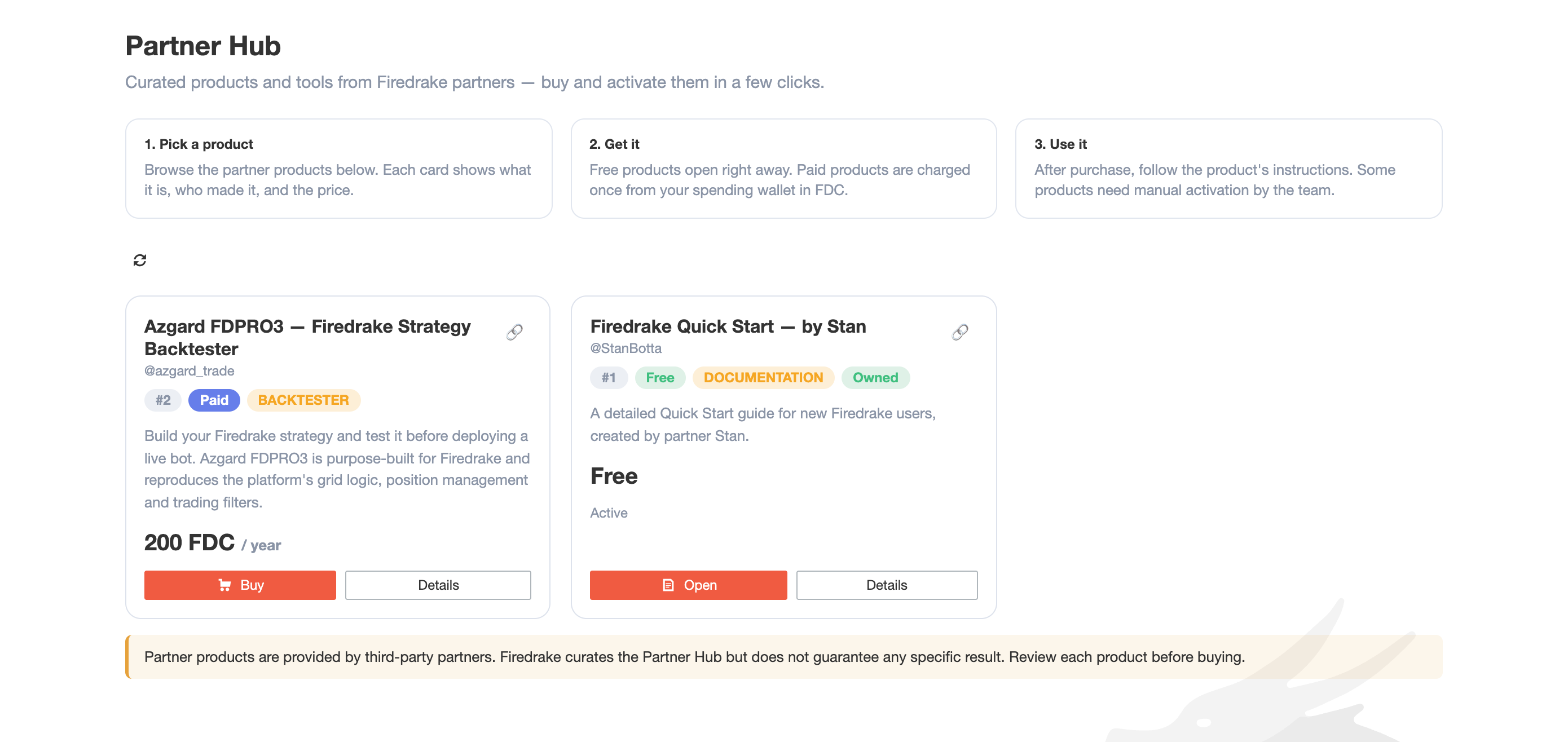
Open Details on any card for the full description, all of the partner's links (website, documentation, support, author channel) and the action buttons.
Free vs paid, one-time vs subscription
- Free products — press Open to go straight to the product or its materials.
- Paid products come in two shapes:
- One-time — you pay once and keep access.
- Subscription — access is valid for a period (days, months or a year) and can be renewed as it nears expiry.
The price shown on the card is always the real, server-side price — you are never charged more than it says.
Buying a product
- Press Buy on the card (or inside Details).
- If the product needs a detail to set you up — for example your TradingView username or email — enter it in the purchase window. This is what the partner uses to grant you access, so make sure it is correct.
- Confirm. The FDC price is charged once from your Service Balance, and the purchase is recorded in Spending Wallet → Transactions.
You need enough FDC on your Service Balance; buy FDC in the Spending Wallet if needed. If you already own a product, the Buy button is hidden and replaced by Open (and Renew for subscriptions that are near expiry), so you cannot accidentally pay twice.
Activation
Some products are delivered by the partner and need manual activation — for example, the partner has to grant your TradingView account access to their tool. Right after purchase such a subscription shows Activation pending, and the partner is notified to set you up.
If the partner has stated how long activation takes, you see it before you pay — the purchase window says Activation may take up to N h after purchase — and again after purchase, next to the status: Activation pending · up to N h.
When they activate your access you receive a Telegram confirmation (Access activated) from the Firedrake | Notifications bot, and the card switches to active. Make sure your Telegram is linked so you do not miss it.
Subscriptions, expiry and renewal
For a subscription product the card shows the date your access is valid until.
Before your subscription expires, Firedrake sends you a reminder in Telegram (via the Firedrake | Notifications bot) so you have time to renew and keep access. Inside that lead window a Renew button appears on the card and in Details — renewing extends your access by another period and charges the FDC price again. Outside the window there is nothing to do; renewal opens closer to the expiry date.
If a subscription lapses its access ends — you can always buy it again from the card.
Purchase history
Every purchase and renewal appears in Spending Wallet → Transactions as an FDC entry.
Sharing a link to a product
Each card has a link button (🔗) that copies a short link straight to that product. Anyone who opens it lands on the Partner Hub with that card highlighted — handy for pointing someone to a specific product instead of the whole section.
Requirements and good to know
- A linked Telegram, for activation and expiry reminders — see Connect Telegram.
- Enough FDC for paid products — see Spending Wallet.
- Partner products are provided by third-party partners. Firedrake curates the Partner Hub but does not run the products and does not guarantee any specific result. Review each product's own description, links and terms before buying.
Summary
Use Partner Hub to discover and get partner-built tools and services in one place — free or paid in FDC. Buy in a couple of clicks, activate through the partner, keep an eye on your subscription with Telegram reminders, and renew when you are ready.