Grid Calculator
The Grid Calculator is a planning tool for users who want to prepare safety-order grid settings before using them in live Futures trading.
Open this section when you want to compare grid settings systematically instead of selecting them by guesswork.
What this section is for
Grid Calculator helps users evaluate possible bot configurations before creating or updating a bot.
Grid settings are often chosen based on assumptions, habit, or manual experimentation. Here, users can define their limits and let the calculator search through possible combinations.
Use the calculator when you want to:
- define your budget and preferred grid size;
- set acceptable ranges for safety-order parameters;
- compare many possible combinations in one place;
- find settings that provide more efficient averaging;
- prepare a stronger starting point for bot configuration.
If you provide only the required basic inputs and leave the rest of the ranges broad, the calculator can help surface some of the most efficient available variants within those conditions.
Terms and conditions
Before using the calculator, the user is asked to review and accept the terms shown in the section.
The calculator is a planning tool. It helps users prepare settings more carefully, but any result should still be reviewed thoughtfully before being applied to live trading.
Order Grid Calculator
The main working area of the page is the calculator form.
Here the user enters the inputs that define the search space for possible grid setups.
Typical inputs include:
- first order amount;
- leverage;
- available resources;
- position side;
- grid size;
- minimum and maximum number of safety orders;
- minimum and maximum step values;
- martingale-related values.
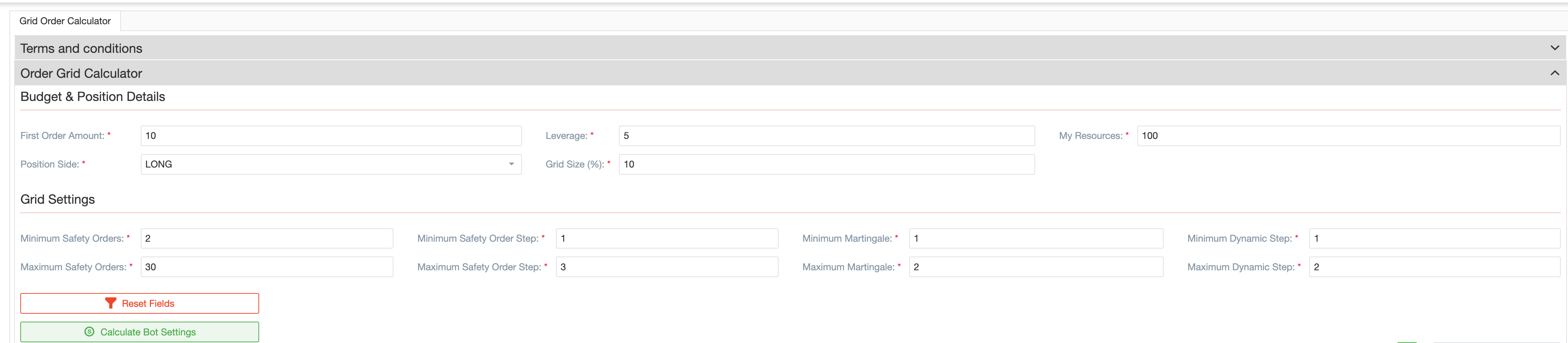
The idea is simple: instead of building a grid manually and checking one variant at a time, the user defines a comfortable working range and lets the calculator evaluate many possible combinations.
It gives beginners a clearer starting point and lets experienced traders compare several approaches before choosing one.
Why the calculator helps
Grid settings affect both budget usage and the way the position is averaged if safety orders are triggered.
Because of that, even small changes in step values, martingale values, grid size, or the number of safety orders can lead to very different results.
Grid Calculator helps users understand these trade-offs more clearly by showing which combinations look more efficient within the selected limits.
It helps you:
- move from assumptions to structured comparison;
- see how parameter changes affect the setup;
- explore conservative, moderate, or more aggressive configurations;
- avoid wasting time on manual trial and error.
Proposed Bot Settings
After the calculation is complete, the page shows proposed bot settings.
These results help the user compare different combinations and choose the one that looks most suitable for the intended setup.

Use the result area to:
- compare several possible grid configurations;
- review how the suggested settings differ from one another;
- identify a more efficient configuration within your chosen limits;
- choose a result that can serve as the basis for a bot.
Create Bot flow
A successful result does not have to remain only as a calculation.
If one of the proposed setups looks suitable, the user can continue with Create Bot.
Grid Calculator connects planning with actual bot configuration.
When this flow is used, the calculator opens the bot settings form with the calculated values already filled in. The user can then complete the remaining fields and save the configuration for future use.
Usage History
The Usage History section allows users to review previous calculator runs.

Use this section when you want to:
- remember which setups were already tested;
- compare earlier attempts;
- review whether a previous run ended with a result or an error;
- return to previous work instead of starting from scratch every time.
How this section fits into Skill Factory
Inside Skill Factory, Grid Calculator serves as a practical planning and learning tool.
It is aimed at users who want to understand bot settings better and prepare Futures configurations more carefully before creating a bot or changing an existing one.
The workflow looks like this:
- Open the calculator.
- Review and accept the terms.
- Enter the values and ranges for the setup you want to explore.
- Review the proposed bot settings.
- Continue with Create Bot if a result looks suitable.
- Use Usage History later if you want to compare runs.
Summary
Use Grid Calculator when you want to prepare grid settings in a more deliberate and organized way.
The section lets users compare possible configurations, understand how settings affect the grid, and turn the selected result into a practical starting point for bot configuration.