Connect Telegram
The Connect Telegram section is designed to connect the Firedrake Telegram bot, granting access to notifications, monitoring, and trading strategy management directly from your mobile device.
Connecting Telegram is not mandatory, but it significantly simplifies account monitoring, especially in situations where there is no access to the web interface.
Why connect Telegram
The Firedrake Telegram bot allows you to:
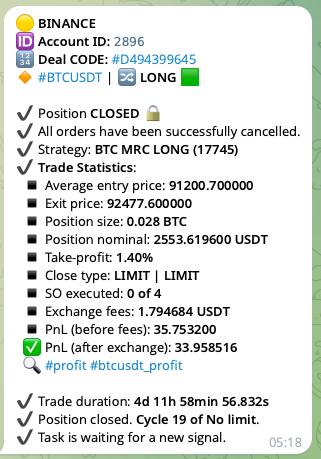
- Receive prompt notifications about trading actions and system events;
- Monitor the status of your Spot and Futures portfolios;
- Manage trading strategies and positions directly from Telegram.
Essentially, the Telegram bot provides a fast and convenient way to control the platform in real-time, right from your phone.
Available Functionality
Notifications
After connecting Telegram, you can receive:
- Notifications about actions on Spot (configured in the Spot section);
- Notifications about actions on Futures (configured in the Futures section);
- System notifications (opening and closing positions, TP/SL execution, and other events).
Spot
In the Spot section of the bot menu, you can access:
- Current PnL of the entire spot portfolio;
- PnL with masked absolute values (useful for public or insecure environments).
Futures
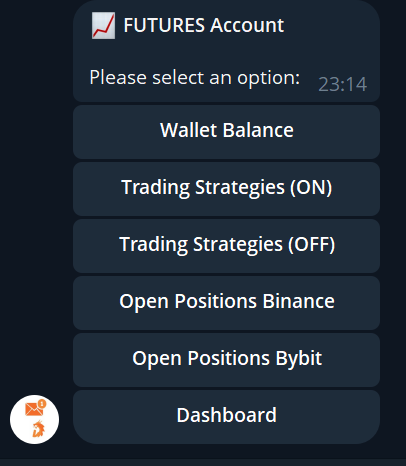
In the Futures section of the bot menu, you can access:
- Balance view of connected futures accounts;
- List of enabled strategies with the ability to disable a strategy directly from the bot;
- List of disabled strategies with the ability to enable them back.
This is especially convenient if you need to urgently stop or activate a strategy without access to a computer.
Additionally, from the Telegram bot you can:
- View open positions on Binance and Bybit;
- Receive futures statistics for a selected period;
- View details of open positions;
- Manually close positions directly from the bot.
How to connect Telegram
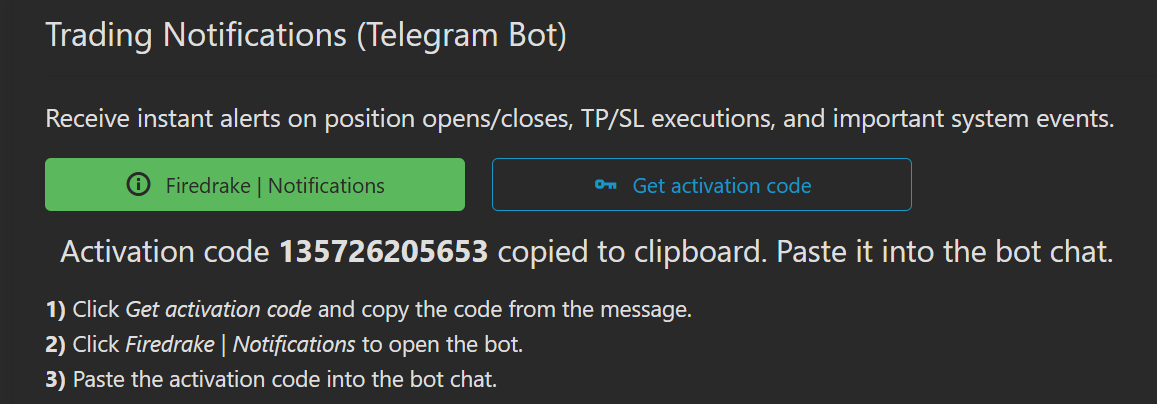
To link your Telegram account to the platform, follow these steps:
- Click Get activation code and copy the code from the message.
- Click Firedrake | Notifications to open the Telegram bot.
- Paste the copied code into the chat with the bot.
After this, Telegram will be linked to your profile, and the functionality will become automatically available.
Additional Telegram Resources
The Connect Telegram section also provides links to additional Firedrake Telegram resources:
Insights (Bot and Group)
Insights Bot — provides analytical data and market reports available in the terminal:
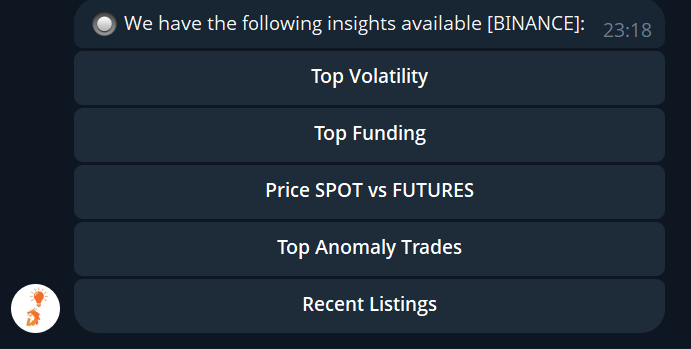
- High volatility;
- Funding rates;
- Spot vs Futures divergences;
- Abnormal trades;
- New listings.
Insights Group — a channel with push notifications for analytics and trading signals.
Community
Community (RU / EN) — Telegram channels for discussing platform updates, releases, and announcements.
Users share experiences, observations, and ideas for improving the platform.
Support
Support Group (RU) — a user support Telegram group where you can ask questions and get help with the platform.
Summary
Connecting Telegram allows you to:
- Control Spot and Futures without access to the web interface;
- Receive important notifications in real-time;
- Promptly manage strategies and positions;
- Use analytics and signals directly from Telegram.