Connecting an Exchange Account
Firedrake connects to exchange accounts directly via the official exchange API, using API keys. The platform does not have access to funds withdrawal and works strictly within the permissions defined by you when creating the keys.
Before starting, we recommend reviewing the instructions for creating API keys on the exchange: 👉 Creating API Keys
Security Recommendation
We strongly recommend creating API keys immediately at the moment of connecting the exchange account to Firedrake:
- Create the API Key and Secret Key on the exchange side.
- Immediately paste them into the account connection form in Firedrake.
- After that, do not save the keys anywhere else (in files, notes, password managers, etc.).
This approach reduces the risk of key leakage and increases the overall security of your account.
If you don't have an exchange account yet
If you do not yet have an account on the supported exchanges, you can register using the following links:
- Binance BInance registration
- Bybit Bybit registration
After registration and basic account setup, you can proceed to connect it in Firedrake.
Connecting an Exchange in Firedrake
To connect an exchange account:
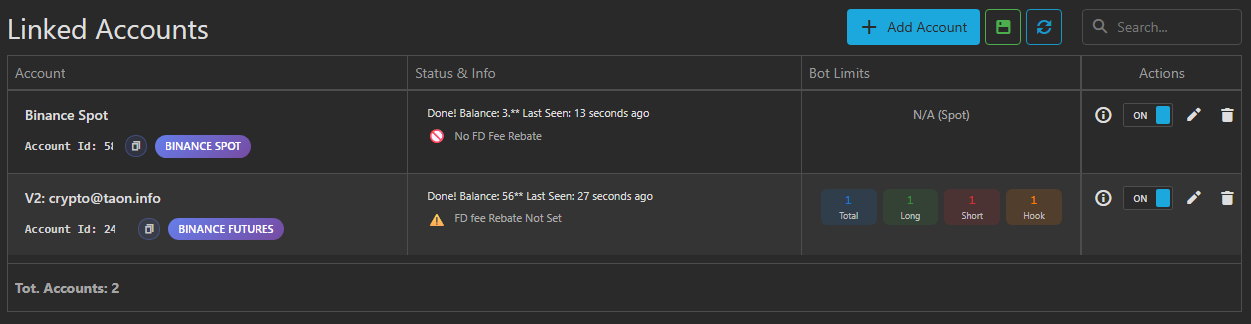
- Go to the Linked Accounts section.
- Click the Add Account button.
- Fill in the following fields in the window that opens.
Connection Parameters
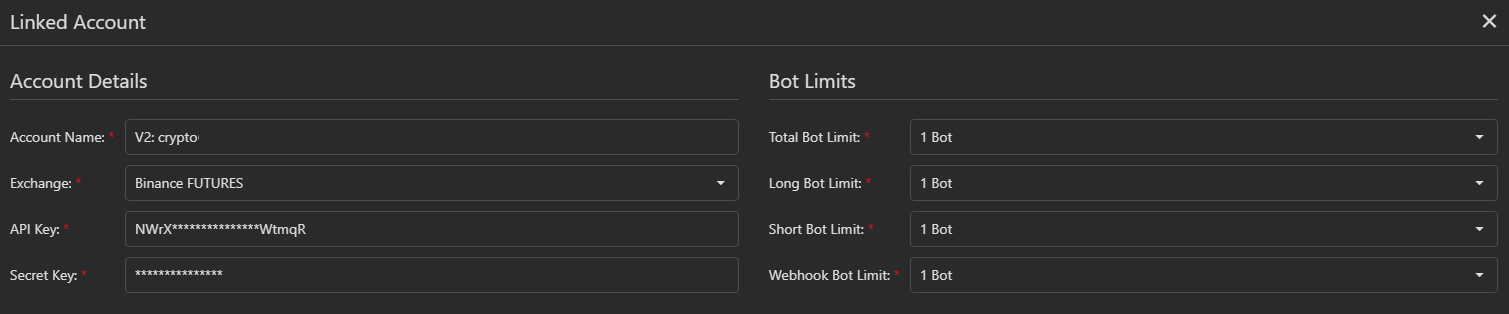
Account Name An arbitrary name for the account — needed only for your convenience. This is especially useful if you have multiple accounts or subaccounts connected.
Examples:
Binance Futures Sub Acc 1Bybit MainBinance Spot Long Only
Exchange Select the market type:
- SPOT — spot market
- FUTURES — futures market
API Key / API Secret Paste the API keys created on the exchange side.
Bot Limits (FUTURES only)
When connecting a FUTURES account, limits on the number of bots become available:
- Total Bot Limit — total limit of active bots
- Long Bot Limit — limit of bots for long positions
- Short Bot Limit — limit of bots for short positions
- Webhook Bot Limit — limit of bots launched via webhooks
To make these settings clear, the concept of bots in Firedrake is briefly explained below.
What is a bot in Firedrake and how does it work?
In Firedrake, a bot is the logic that "manages a trade" from the moment of entry to the full closing of the position.
An active bot is created every time:
- a strategy triggers,
- a webhook arrives,
- or the user manually opens a position.
The bot performs the following tasks:
- places the first order to enter the position;
- places take profit, stop loss, and a grid of safety orders according to the entry settings;
- monitors the triggering of safety orders and recalculates take profit after position averaging;
- re-places orders if they were accidentally deleted or cancelled;
- cancels remaining safety orders and stop loss if the position closed by take profit;
- calculates the trade result (PnL);
- sends notifications about trade closure.
Simply put, the bot completely accompanies the trade from entry to exit.
👉 One bot = one open position.
How bot limits work (example)
Suppose the following limits are set:
- Total Bot Limit = 4
- Long Bot Limit = 2
- Short Bot Limit = 2
- Webhook Bot Limit = 1
Scenario:
- A long strategy triggers for BTC → 1st long position opens.
- The same long strategy triggers for ETH → 2nd long position opens.
- A short strategy triggers for XRP → short position opens.
- Another long strategy triggers for DOGE → ❌ position will not open, as the long bot limit (2) has already been reached.
- A short strategy triggers for LUNA → short position opens (short limit not yet exceeded).
- A webhook signal arrives → ❌ new bot will not start, as the Total Bot Limit = 4 has already been reached.
Thus, limits directly determine the maximum possible number of simultaneously open positions.
Important Recommendation for Beginners
Start with a small number of simultaneously working bots.
This is important for several reasons:
- all bots use the same account balance;
- during sharp market movements, multiple positions can go into drawdown simultaneously;
- when trading with leverage, the load on the balance increases significantly.
A classic mistake when trading futures is when:
- too many bots are launched,
- many positions are opened simultaneously,
- leverage is used,
- and the balance is insufficient to survive the general drawdown.
Result — forced position closures or liquidation.
👉 Gain experience gradually, increase limits consciously, and always evaluate what total drawdown your balance can withstand.
Finishing the Connection
After filling in all fields, click Save.
Firedrake will attempt to:
- connect to the exchange,
- retrieve the account balance,
- check the validity of the API keys.
If the connection is successful:
- a Done! message will appear in the status,
- the account balance will be displayed.
If the connection failed, an error message explaining the reason will be shown in the Status & Info column.
Rebate Status (Firedrake Commission Discount Status)
Rebate Status shows whether the Firedrake commission discount applies to your account:
- ✅ — account receives a 50% discount on Firedrake commission
- ⚠️ — account potentially qualifies but is not yet confirmed (start trading and check the status 24 hours after the first trades)
- 🚫 — discount does not apply to this account
How to get the discount
- Connect the account directly to Firedrake via API.
- Bybit: you can connect the main account or a subaccount.
- Binance: you must connect a subaccount created after 01.05.2025. Main accounts do not participate in the rebate program.
- Accounts connected via brokers or intermediaries do not receive the discount.
Briefly on API Key Security
When creating API keys, always follow these rules:
- enable only read/write trading permissions;
- never enable permissions for withdrawals or transfers;
- strictly add the IP whitelist of Firedrake servers;
- never share the API Key and Secret Key with anyone;
- Firedrake support will never ask you to show keys or create them during screen sharing.
Trading on exchanges is always associated with risks. You are fully responsible for the security of your accounts, API keys, and funds.