Spending Wallet
1. In one line
You pay USDT → you receive FDC → you spend FDC on Firedrake services.
The Spending Wallet is where your Firedrake Credits live. It is an internal account used only inside Firedrake — it is not a cryptocurrency wallet, and Firedrake does not hold USDT for you.
2. What Firedrake Credits (FDC) are
Firedrake Credits (FDC) are internal service credits of the Firedrake platform. They are used to pay Firedrake fees and services: trading commissions, the annual plan, paid strategies in the marketplace and partner products.
When you buy FDC, you pay in USDT. The USDT you send is not credited to your account as USDT — it is the payment for the credits. Once the payment is confirmed, the corresponding amount of FDC appears on your Service Balance.
Rate: 1 USDT = 1 FDC. The amount of FDC credited equals the amount of USDT actually received, which is why you should send exactly the amount stated on the invoice.
- FDC is not a cryptocurrency and not a token;
- FDC has no value outside Firedrake;
- FDC is not intended for use outside the platform.
Example
Purchase: 50 USDT → 50 FDC → Service Balance
The 50 USDT are the payment for the credits. No USDT balance appears on your account — you now have 50 FDC to spend on Firedrake services.
3. The two balances
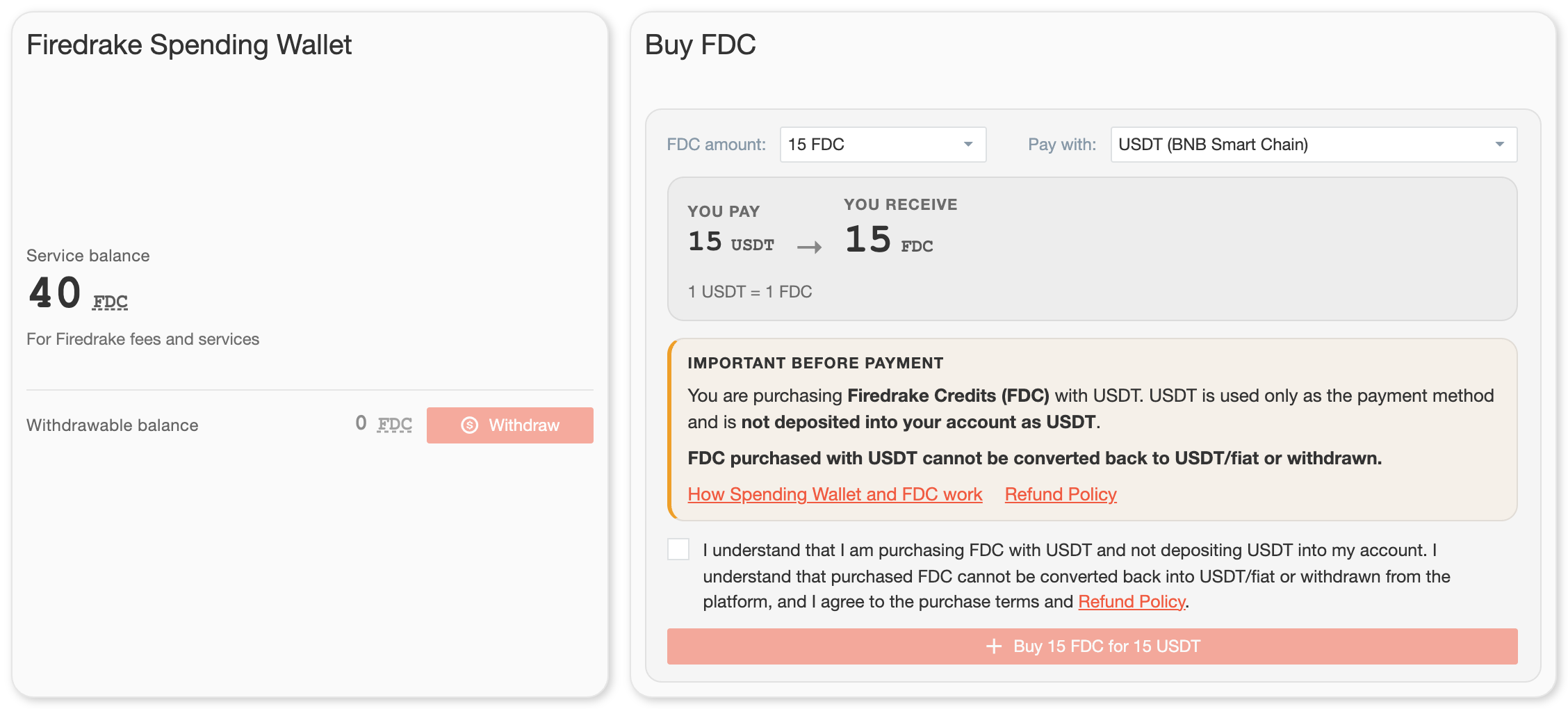
The wallet shows two separate balances. They follow different rules, and this is the single most important thing to understand about the wallet.
Service Balance
What you spend on the platform.
What goes in:
- FDC you bought with USDT;
- the welcome bonus credited at registration (15 FDC);
- FDC you transferred here from the Withdrawable Balance.
What it pays for: trading commissions, the annual plan, marketplace strategies, Partner Hub products.
Restrictions. FDC purchased with USDT and credited to the Service Balance:
- cannot be converted back into USDT or fiat;
- cannot be withdrawn to an external wallet;
- cannot be moved to the Withdrawable Balance.
The platform has no mechanism for any of the three — the direction is one-way, into the Service Balance and out through usage. Purchases are covered by the Refund Policy.
Withdrawable Balance
What you have earned on the platform rather than bought.
What goes in:
- referral rewards — 20% in FDC of every FDC purchase made by users you invited (see Profile and Referral Program);
- your share of paid strategy copies — when someone imports a strategy you published for a price (see Sharing & Copying Strategies);
- your share of Partner Hub sales, if you are a partner whose product is sold for FDC;
- amounts returned by the platform — for example a withdrawal that did not go through;
- credits made by the Firedrake team (compensations, partner settlements).
What you can do with it — two options:
- Transfer to the Service Balance and spend it on Firedrake services. Any amount from 1 FDC, applied immediately.
- Withdraw to an external USDT wallet. Minimum 100 FDC. Network: USDT on BNB Smart Chain (BEP-20) only.
FDC you bought are not withdrawable. FDC you earned are. They sit on different balances for exactly that reason.
4. Buying FDC
Open Platform → Spending Wallet and use the Buy FDC card.
- In FDC amount, choose how much FDC you want to buy (the smallest amount is 15 FDC).
- Pay with shows USDT (BNB Smart Chain) — FDC are bought only with USDT on BNB Smart Chain (BEP-20).
- Check the summary: YOU PAY X USDT → YOU RECEIVE X FDC, with the rate below it.
- Read the purchase conditions in the IMPORTANT BEFORE PAYMENT block and, if you want the detail, the Refund Policy.
- Tick the confirmation box. It is unticked by default and is required for every purchase — the button stays disabled until you tick it.
- Press Buy X FDC for X USDT.
- The platform creates an invoice and opens it.
- Pay the invoice before the time runs out, in either of two ways:
- send the stated USDT amount on BNB Smart Chain (BEP-20) to the Address shown on the invoice — copy it with the button next to it or scan the QR code;
- or follow Open the payment page (the Payment page line) — it opens the payment provider's own page for the same payment, with the same address and amount. Handy if you prefer to pay from there or want to come back to the payment later. The link is shown only while the invoice can still be paid.
- After sending, you can press Paid on the invoice to mark it as paid.
- Once the payment is confirmed, the purchased FDC are credited to your Service Balance.
You can reopen any invoice later from the Invoices list (see History).
5. The invoice
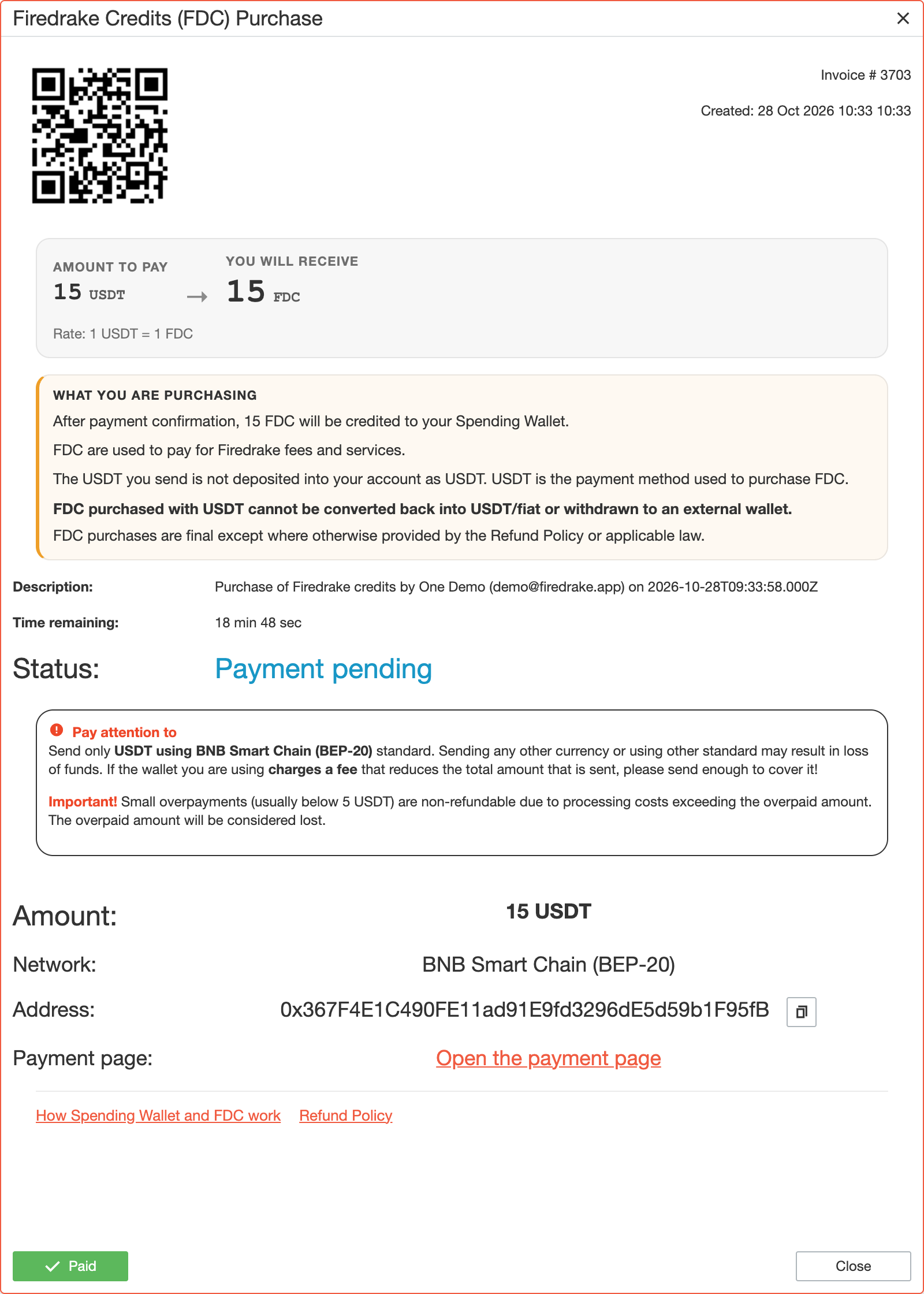
The invoice is headed Firedrake Credits (FDC) Purchase and shows:
- the FDC you will receive and the USDT to pay, with the rate;
- what the payment buys, under WHAT YOU ARE PURCHASING;
- the payment network — BNB Smart Chain (BEP-20) — and the address, with a QR code;
- while the invoice can still be paid, a Payment page line with the Open the payment page link;
- the time remaining — the invoice is valid for 1 hour;
- the payment status;
- links to this page and to the Refund Policy.
An invoice asking for 50 USDT means 50 USDT is the payment for 50 FDC. It does not mean that 50 USDT will be credited to your Firedrake account.
6. Payment requirements
- Send only USDT, and only on BNB Smart Chain (BEP-20) — the network shown on the invoice;
- send to the address shown on that invoice and no other;
- sending a different token, or using a different network, may result in the loss of the funds — such transfers cannot be recovered;
- allow for your wallet's or exchange's own fee: the invoice amount has to arrive in full, so if the fee is taken out of the amount you send, send enough to cover it. If less than the invoice amount arrives, the payment fails and no FDC are credited; the payment provider returns the funds — it contacts you by email to arrange the refund.
Small overpayments (usually under 5 USDT) are not refunded — the cost of processing a return exceeds the amount.
7. History
The wallet keeps three lists.
Transactions
Every movement: FDC purchases, commission charges, internal transfers, marketplace and Partner Hub payments, referral rewards.
Invoices
Your FDC purchase invoices: status (pending / confirmed / failed), the amount requested, paid and received, and the amount still outstanding.
Withdrawals
Requests to withdraw from the Withdrawable Balance, and their status.
8. Withdrawing from the Withdrawable Balance
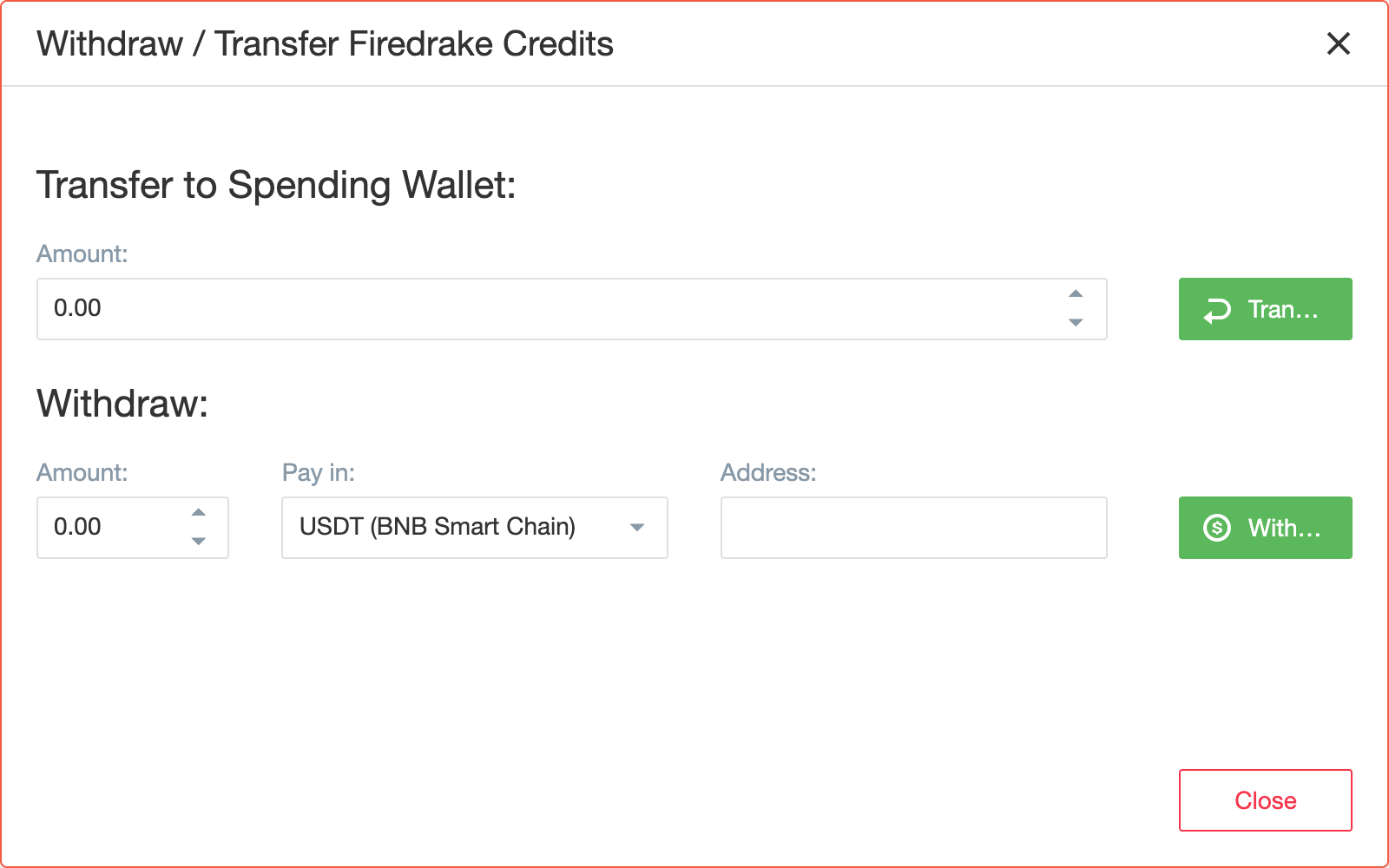
Only the Withdrawable Balance can leave the platform, and only under these rules:
- Minimum amount: 100 FDC. Below that, the balance can still be transferred to the Service Balance and used inside Firedrake.
- Network: USDT on BNB Smart Chain (BEP-20) only — Pay in offers just USDT (BNB Smart Chain). Enter a BNB Smart Chain address: it is checked against that format before the request is accepted.
- One request at a time: while a request is being processed, a second one is refused. The requested amount is held aside until the payout is confirmed, and returned to your Withdrawable Balance if it is not.
- Amount: exactly the amount you request is deducted from the Withdrawable Balance; Firedrake adds no fee of its own.
Transferring to the Service Balance has no minimum beyond 1 FDC and is applied immediately.
9. Refunds and withdrawals are different things
- A refund is the reversal of a purchase, and only in the narrow cases described in the Refund Policy.
- A withdrawal is moving eligible FDC out of the Withdrawable Balance under the rules in section 8.
Buying FDC and then deciding not to use them does not make them withdrawable. See the Refund Policy for the full terms.