Platform Indicators
This section explains every indicator and market metric you see in Firedrake: what each one measures, what it is for, and how to use it — on its own and in combination with others.
The same indicators appear in four places:
- the Futures Terminal screener — one card per contract, with a block of indicators for every timeframe;
- the TradingView chart — the Mean Reversion Channel (FireDrake), Clouds (FireDrake) and Divergence (FireDrake) studies, plus MRC MTF (FireDrake) and Clouds MTF (FireDrake), which show the MRC and the cloud of a higher timeframe on top of the chart (see TradingView chart);
- the Advanced Filters of the screener — to narrow the list down to contracts in a given state;
- Trade Strategies — to let the platform open deals automatically when the conditions are met.
So a condition you find useful on the chart can be checked in the screener first and then turned into a strategy rule. This includes divergence: in trade strategies it is a condition of its own, on confirmed divergences only.
How to read a timeframe block in the terminal
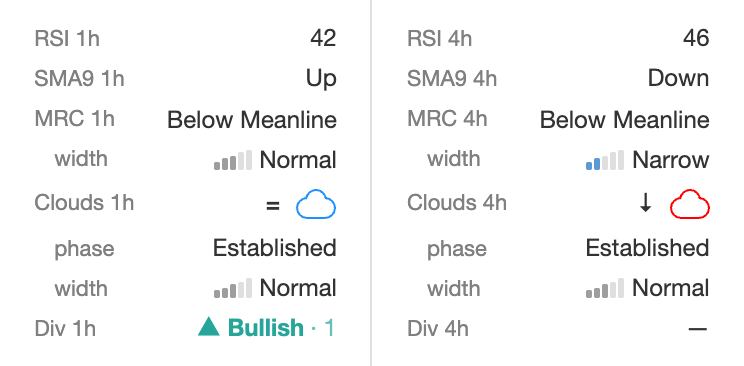
Each timeframe column shows, from top to bottom:
| Row | What it tells you | Page |
|---|---|---|
| RSI | Momentum, 0–100. Above 70 is shown in red, below 30 in green. | RSI |
| SMA9 | Short-term direction: price above (Up) or below (Down) its 9-candle average. | SMA9 |
| MRC | Which zone of the Mean Reversion Channel the price is in right now. | MRC |
| ↳ width | How wide the channel is compared with its usual width. | Market regime |
| Clouds | Arrow = price below (↓), inside (=) or above (↑) the cloud; icon = cloud colour. | Clouds |
| ↳ phase | The stage of the cloud: thin, narrowing, intermediate, widening, established, expanded. | Market regime |
| ↳ width | How wide the cloud is compared with its usual width. | Market regime |
| Div | Divergence: ▲ bullish or ▼ bearish, confirmed N closed candles ago; a blinking ◌ — forming on the current candle. | Divergence |
The other columns of the card show exchange data (funding, leverage, order size), volume and risk, and volatility — see Market and risk metrics.
Timeframes
Indicators are calculated separately for each timeframe: 1m, 5m, 15m, 30m, 1h, 4h, 1d, 1w. This applies to every indicator — MRC zones, RSI, SMA9, clouds, the market regime and divergence — in the screener, in the strategies and on the chart. A week candle opens on Monday 00:00 UTC, as on Binance, Bybit and TradingView.
In the screener the 1d and 1w columns are hidden by default — turn them on in the column chooser, see Terminal Screener. On the chart, the MRC MTF and Clouds MTF studies can also show the MRC and the cloud of 1d or 1w on top of a lower-timeframe chart.
Lower timeframes react fast and change often; higher timeframes are slower and describe the bigger picture. A common way to work is to take the direction from a higher timeframe (for example 1h or 4h) and the entry timing from a lower one (for example 5m or 15m). The filter sets in Monitoring in the Screener follow this approach.
Live values and closed candles
Not every indicator is updated in the same way, and it matters when you build rules:
- RSI, SMA9 and the MRC zone are live. They include the candle that is still forming, so they change during the candle together with the price. A condition can become true and then false again before the candle closes.
- Cloud colour is fixed for the whole candle. It is decided by the previous closed candle and does not repaint.
- The market regime classes (widths and cloud phase) use closed candles only. They change once per candle, shortly after it closes.
- Price vs cloud is live — the current price is compared with the cloud continuously.
- A confirmed divergence uses closed candles and stays active for 3 of them (or until the price breaks its low or high). A forming divergence is live and may disappear before the candle closes.
When a value is missing
A value can be temporarily unavailable — for example for a contract listed only recently, where there is not yet enough history to build the indicator. In that case:
- the terminal shows — (or a grey cloud icon);
- the screener filters and strategy conditions treat the contract as not matching a condition that asks for a specific value.
Indicators are built from the coin's listing, and the clouds and the regime classes need the longest history, so fresh listings get them last. On the long timeframes this is especially visible: on 1d and 1w a recently listed coin has no values for a long while. "No data" never satisfies a strategy condition, so a strategy with, for example, a 1w cloud condition simply does not pick such coins.
The metrics taken from CoinMarketCap — 24h volume level, turnover level, risk level, rank and market cap — can be missing for good, not just for a while: when the coin is not listed on CoinMarketCap, or when the coin with the same ticker there is a different asset. They are not always shown as —: for example, the rank is then shown as #99999. See Market and risk metrics.
What indicators are and are not
Indicators describe the current state of the market in a consistent, measurable way. They do not predict the future and do not guarantee a result. The examples in this section show how traders typically use them; whether a setup suits you depends on your risk tolerance, deal settings and testing. See also Risk & Responsibility.
Pages in this section
- RSI — momentum and overbought / oversold readings.
- SMA9 — short-term price direction.
- Mean Reversion Channel (MRC) — price zones around a long-term fair price.
- Clouds — trend direction and trend support.
- Divergence — price against momentum: bullish and bearish divergences.
- Market regime — MRC width, cloud width, cloud phase, price vs cloud.
- Market and risk metrics — funding, volume, turnover, risk, volatility (coin activity).
- Monitoring in the Screener — ready-made filter sets for typical market questions.
- Quick reference — every value in one place, convenient for analysis and AI tools.