Monitoring Contracts in the Screener
The terminal screener shows every futures contract with all indicators at once. With hundreds of contracts, the useful skill is not reading every card but asking the screener the right question — and keeping those questions as saved filters you can switch between in one click.
This page gives ready-made filter sets for typical monitoring tasks. Each one is a question about the market; the screener answers it with the list of contracts that match right now.
How to work with filter sets
- Open Filters above the screener and set the conditions. Each timeframe has its own group: RSI ≥ / ≤, SMA9, MRC, MRC width, Clouds, Cloud width, Cloud phase, Price vs cloud, Divergence.
- Click Save preset and give it a clear name — for example "Dips in uptrend".
- Switch between presets with Saved filters on the toolbar. The line "Filtered X of Y pairs" shows how many contracts match.
- Sort the result — by volatility rank, turnover 24h or volume 24h — to see the most active or liquid contracts first.
- Click a pair to open its chart and check the picture on a higher timeframe before acting.
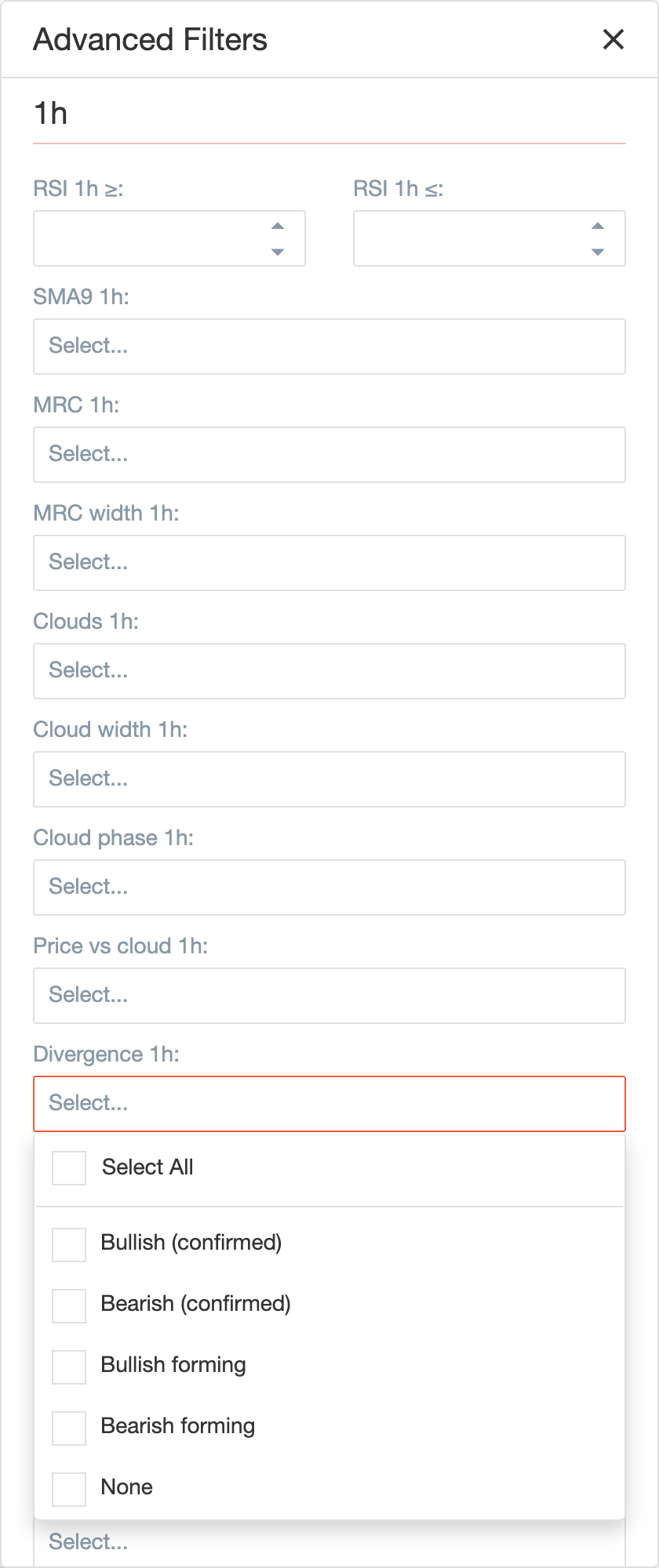
A field left empty means "any". Several values selected in one field mean "any of them"; all filled fields must match together. The list updates live as prices move, so a contract can enter and leave the list during the day.
Reading a card quickly
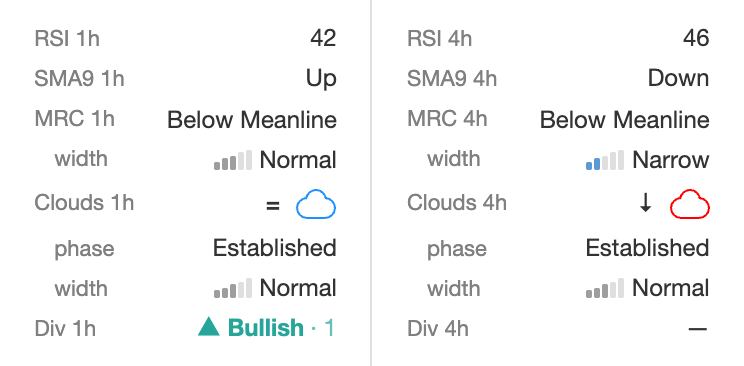
For each timeframe, read the block from top to bottom as three questions:
- Trend — the Clouds row: cloud colour, arrow (price above ↑, inside =, below ↓), then phase (how mature the trend is).
- Location — the MRC row: how far the price is from its fair value; the width under it tells whether the market is calm or wild.
- Momentum and timing — RSI and SMA9; the Div row at the bottom shows whether the move is losing force (see Divergence).
In the example above: on 1h the price is above a red cloud that is narrowing (a downtrend losing strength, the price already on the other side), while on 4h the price is inside a thin blue cloud (a young uptrend that is not confirmed yet). That is a typical picture of a market turning up.
1. Dips in an uptrend
Question: which coins are in a steady uptrend but have temporarily dropped?
| Filter | Value |
|---|---|
| Clouds 1h | Blue |
| Cloud phase 1h | Established, Widening |
| Price vs cloud 1h | Above cloud, Inside cloud |
| MRC 15m | Below Lowband, Weak Oversold, Normal Oversold |
| RSI 15m ≤ | 40 |
| 24h volume level | 100M and above |
How to read the result: these are pullbacks inside healthy trends. Open the 15m chart and look at SMA9 15m / 5m: while it is Down the dip is still going; when it turns Up the bounce has started. A contract whose 1h price drops below the blue cloud falls out of the list — the trend is in question.
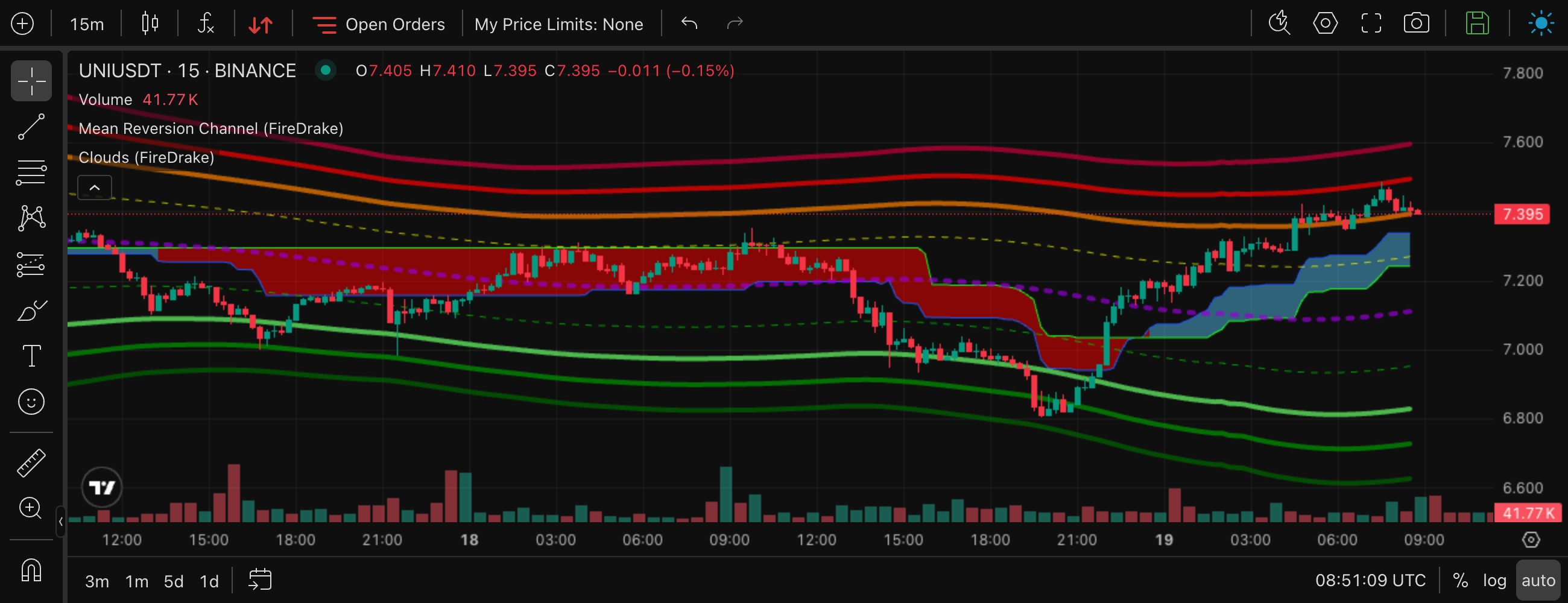
UNIUSDT, 15m — a dip into the oversold zones, the turn and the climb that followed.
2. Rebounds in a downtrend
Question: which coins are in a downtrend and have bounced up to resistance?
| Filter | Value |
|---|---|
| Clouds 1h | Red |
| Clouds 4h | Red |
| Price vs cloud 1h | Inside cloud, Below cloud |
| MRC 15m | Above Meanline, Above Upband |
| RSI 15m ≥ | 55 |
How to read the result: the price has come back up to the mean line or to the red cloud — typical places where downtrend rebounds stop.
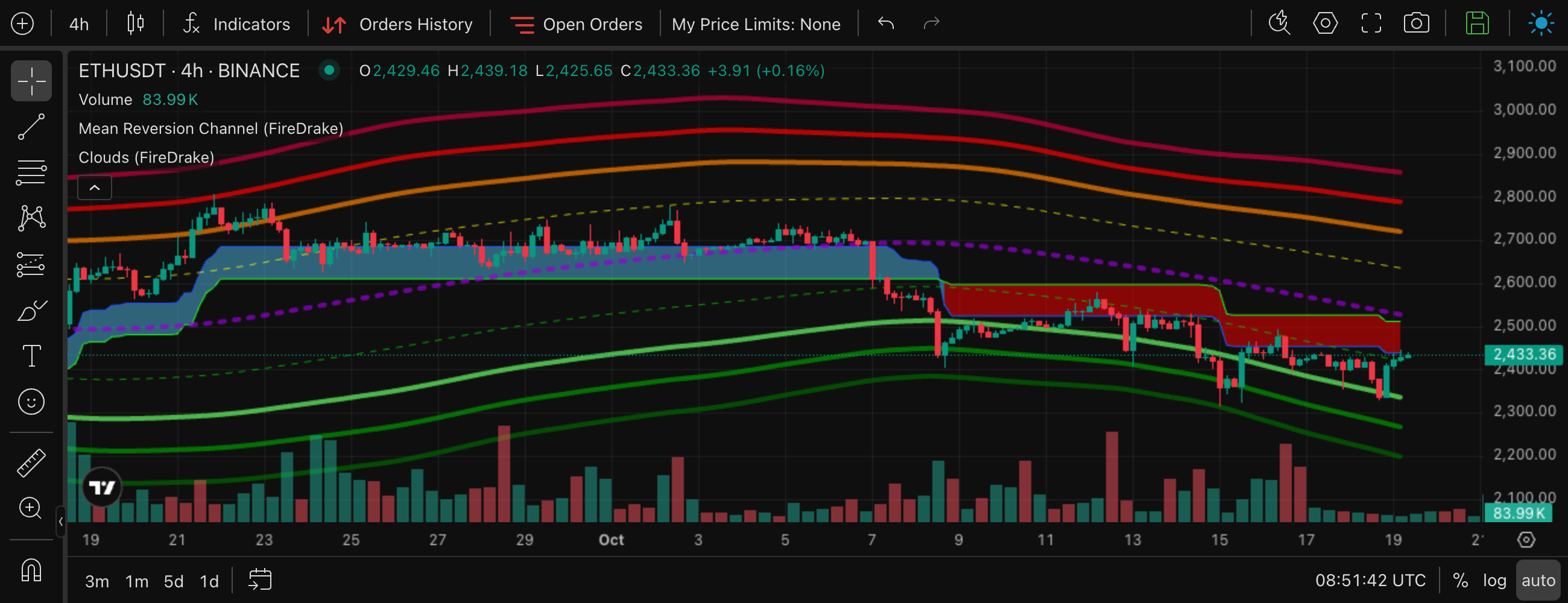
ETHUSDT, 4h — after the cloud turned red, every rebound stopped at it from below.
3. Extreme oversold
Question: where has the price fallen unusually far and fast — candidates for a bounce, regardless of the trend?
| Filter | Value |
|---|---|
| MRC 15m | Normal Oversold, Strong Oversold |
| RSI 15m ≤ | 25 |
| MRC width 15m | everything except Anomalously wide |
| Risk level | Low, Medium |
How to read the result: exhausted sellers in liquid, lower-risk coins. Excluding anomalously wide channels removes markets in panic, where "extreme" can become even more extreme. These are counter-trend situations — check the 1h and 4h clouds before acting.
4. Quiet before the move (squeeze)
Question: which coins have gone unusually quiet and may break out soon?
| Filter | Value |
|---|---|
| MRC width 1h | Very narrow, Narrow |
| Cloud phase 1h | Thin, Narrowing |
| 24h volume level | 100M and above |
How to read the result: this is a watchlist, not a signal. Check it during the day: when a coin breaks out, its lower-timeframe cloud changes colour and the MRC width starts to grow. The colour of the new cloud shows the direction.
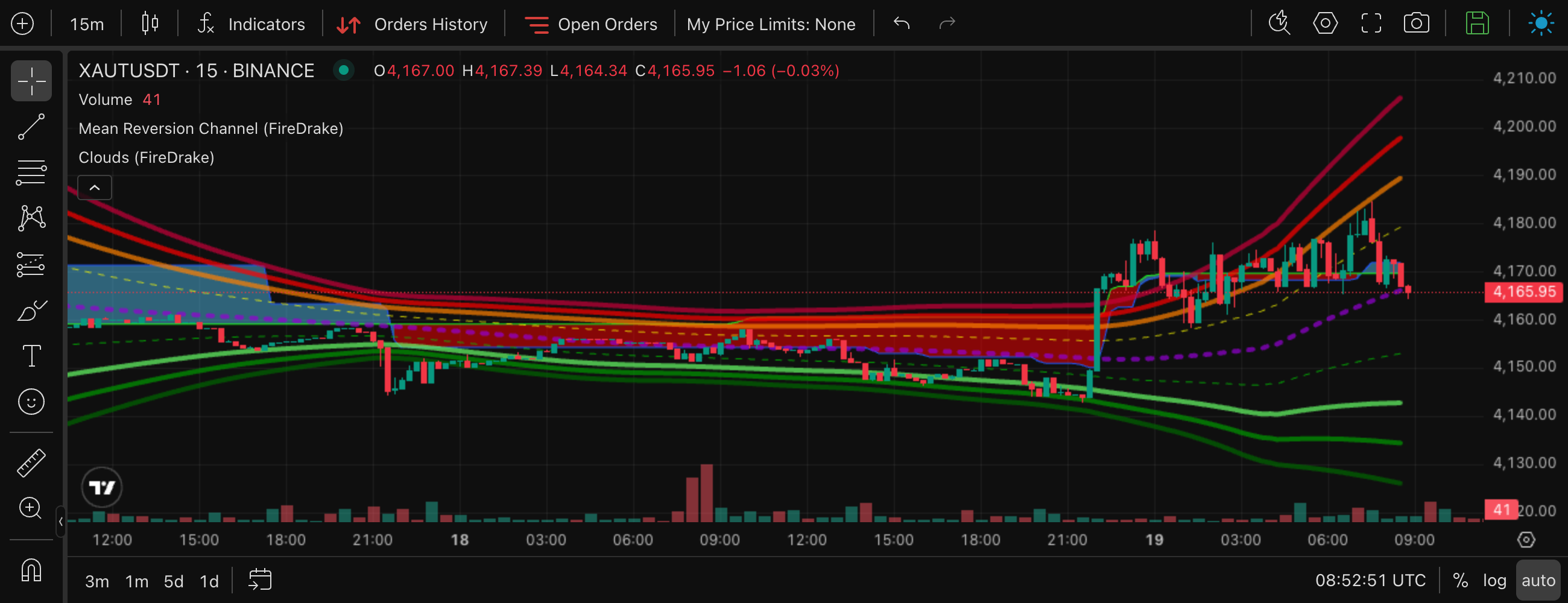
XAUTUSDT, 15m — a day of squeeze, then the breakout: the MRC width jumps from very narrow to anomalously wide.
5. Trends that are just starting
Question: where has a new uptrend just appeared?
| Filter | Value |
|---|---|
| Clouds 15m | Blue |
| Cloud phase 15m | Thin, Widening |
| Price vs cloud 15m | Above cloud |
| Clouds 4h | Red |
How to read the result: the lower timeframe has turned up while the higher one is still down — early reversals. Many of them fail: a thin cloud changes colour most often. Watch whether the 15m phase moves on to Widening and Established and whether the 1h cloud follows.
6. Warning signs for trends
Question: where is an uptrend showing signs of breaking? Useful for contracts you hold or plan to buy.
| Filter | Value |
|---|---|
| Clouds 1h | Blue |
| Price vs cloud 1h | Below cloud |
Optionally add Cloud phase 1h = Narrowing, Thin.
How to read the result: the cloud is still blue, but the price has already fallen through it. On historical data the cloud colour then changed within the next 20 candles in about 40–45% of cases — several times more often than when the price stays above the cloud. For downtrends, use the mirror set: Red cloud and price Above cloud.
7. Overheated rallies
Question: which coins have risen fast and far, with crowded longs?
| Filter | Value |
|---|---|
| MRC 15m | Weak Overbought, Normal Overbought, Strong Overbought |
| RSI 15m ≥ | 75 |
| Funding rate | High (+), Extra High (+) |
Optionally add Cloud phase 1h = Expanded — the move has started to stall.
How to read the result: stretched price, extreme momentum and expensive longs. Strong rallies can keep going, so this is a list to watch, not a reason to short on its own.
8. Market pulse
The "Filtered X of Y pairs" counter is itself a market indicator. Keep a few one-line presets and look at the numbers:
| Preset | What a high count means |
|---|---|
| Clouds 1h = Blue | a broad uptrend on 1h |
| Clouds 4h = Red | a broad downtrend on the higher timeframe |
| MRC 1h = any Oversold zone | a market-wide sell-off |
| MRC width 1h = Very wide, Anomalously wide | an unusually volatile market — news or liquidations |
If 80% of contracts are under a red 4h cloud, a long idea on a single coin is swimming against the whole market.
From monitoring to trading
When a filter set keeps finding good situations, it can become a trade strategy: the platform will then watch the same conditions for you and open deals automatically. The reverse also works — load any strategy into the screener filters, or click Open in screener right in the strategy form, to see which contracts match it right now.
Market regime conditions (MRC width, cloud width, cloud phase, price vs cloud) carry over to a strategy like the other filters: see Using the regime in trade strategies.
What each indicator means: Platform Indicators. All values in one table: Quick reference.