Trade Strategies
The Trade Strategies section is used to define how the Futures module should look for trading opportunities and decide when a setup is suitable for entry.
Open this section when you want to build a repeatable trading process instead of reviewing instruments manually each time from scratch.
Why this section matters
Without a strategy, futures trading quickly becomes inconsistent. The same instrument can lead to different decisions on different days.
Trade Strategies help solve that problem by turning trading ideas into a structured set of rules. Instead of rethinking the setup every time, you define the logic once and then work with it in a more disciplined and repeatable way.
What users do in this section
This section is where users create and manage strategy records.
In this section, users can:
- create a new strategy;
- edit an existing one;
- enable or disable a strategy;
- duplicate a strategy to create a variation;
- remove a strategy that is no longer needed;
- search, filter, and organize the strategy list.
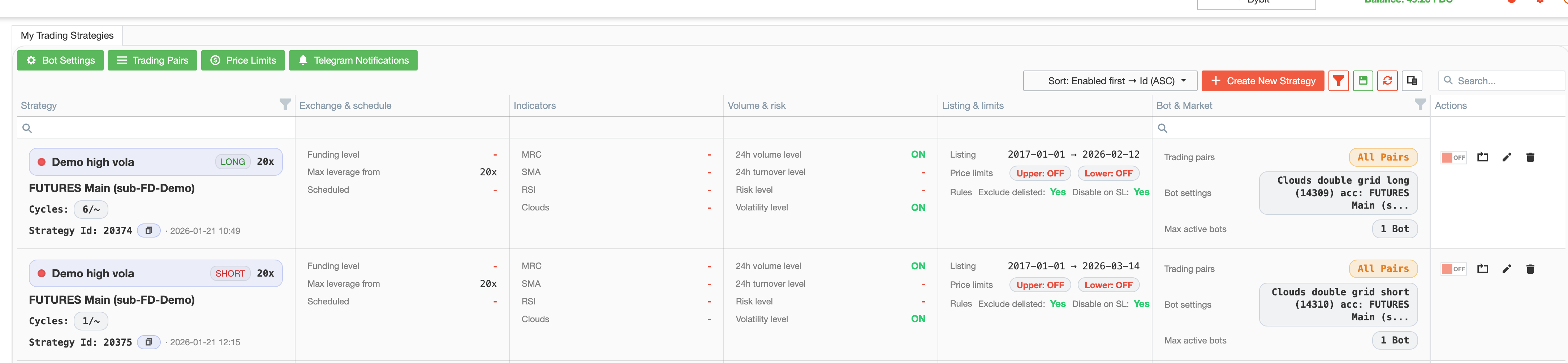
The section supports both initial setup and ongoing strategy maintenance.
What a strategy includes
This is where you define the conditions under which the platform should consider a setup suitable for entry.
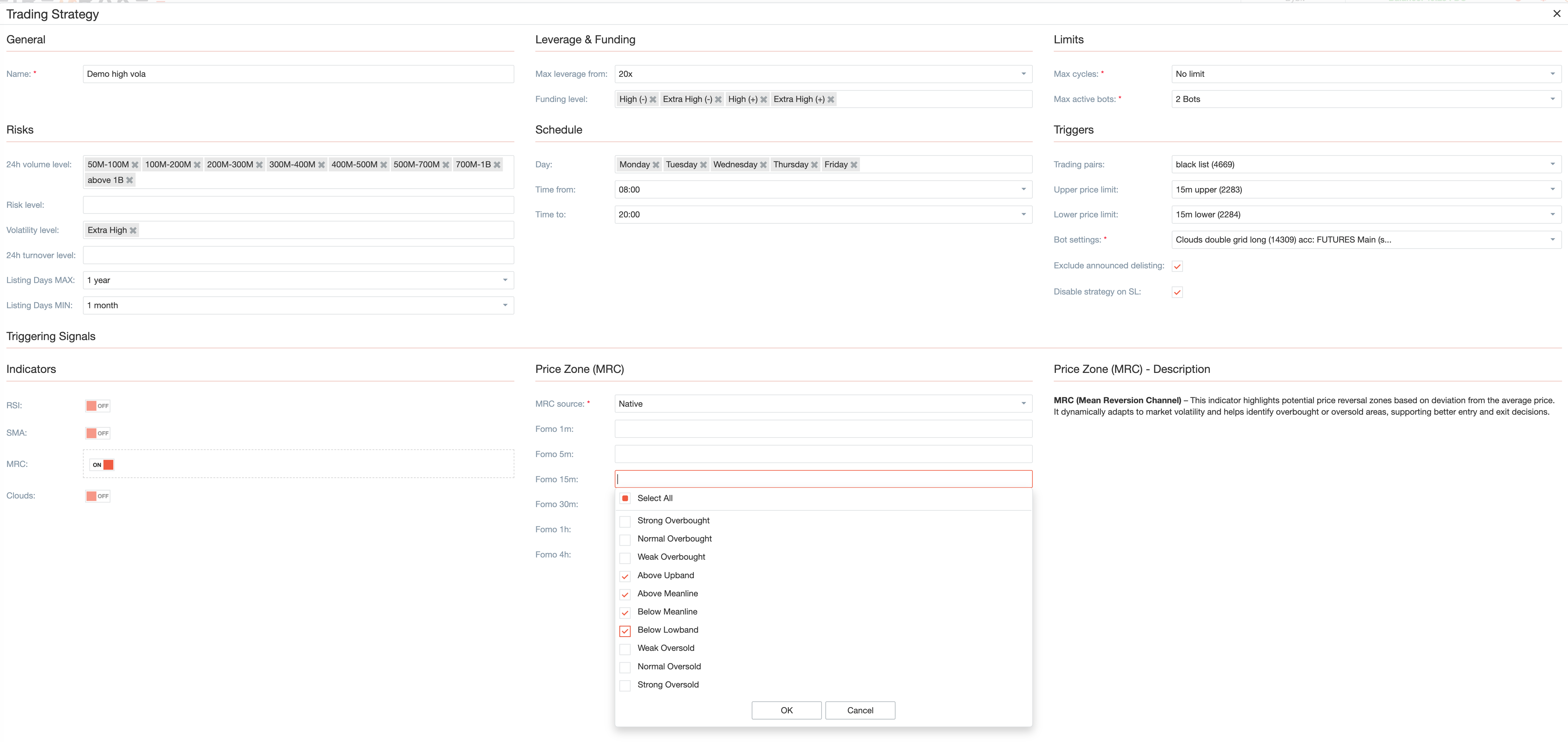
A strategy can include:
- the strategy name;
- general selection rules for instruments;
- leverage-related restrictions;
- funding-related conditions;
- limits on active bots;
- limits on strategy cycles;
- filters related to volume, turnover, risk, and volatility;
- restrictions related to listing age or listing quality;
- day and time limitations;
- signal groups such as RSI, SMA, MRC, and Clouds;
- links to Trading Pairs, Bot Settings, and Price Limits.
A strategy defines when the Futures module considers an entry valid.
Signal groups
One of the main ideas in this section is that you do not need to enable every available signal.
Instead, strategies can be built by turning on only the signal groups that are relevant to the trading idea.
RSI
The RSI group is used when you want momentum or overbought/oversold logic to be part of the strategy.
SMA
The SMA group is used when you want moving average conditions to be part of the setup.
MRC
The MRC group is used when you want the strategy to use price-zone logic and mean-reversion style conditions.
Clouds
The Clouds group is used when you want cloud-based trend or structure conditions to be part of the setup.
Why selective signal groups work better
A strategy becomes clearer and easier to maintain when only the necessary signal groups are enabled.
This keeps the setup focused and helps avoid strategies that are too broad, too complicated, or difficult to understand later.
Day and time restrictions
A strategy does not always need to work continuously.
This section can also be used to define when the strategy is allowed to operate. That is useful when you want a strategy to work only on selected days, during specific hours, or within a more controlled trading schedule.
This keeps strategy behavior aligned with your trading routine.
Risk and instrument filters
Trade Strategies are not limited to indicator logic.
They also help narrow down the set of instruments using practical filters such as:
- leverage-related conditions;
- funding-related conditions;
- volume and turnover filters;
- risk and volatility conditions;
- listing-related restrictions.
These filters help you focus on instruments that better match the intended trading style.
Linked sections
A strategy does not work on its own. It is connected to other Futures sections that define how the strategy should be executed and supported.

Bot Settings
Bot Settings define how a trade should be managed after entry. This includes practical trading setup details such as first-order logic, risk control, position protection, and grid behavior.
Trading Pairs
Trading Pairs help limit the strategy to a selected set of instruments instead of the full list of available instruments.
Price Limits
Price Limits add reusable price-related restrictions that can be attached to the strategy.
Telegram Notifications
Telegram Notifications help you receive strategy- and trade-related events outside the platform interface.
Together, these sections cover trade selection, execution settings, and notifications.
Typical setup workflow
A practical workflow usually looks like this:
- Create a strategy and give it a clear name.
- Define the general restrictions such as leverage, funding, and risk filters.
- Enable only the signal groups that fit the idea behind the strategy.
- Add day and time restrictions if the strategy should not work continuously.
- Link the strategy to the appropriate Bot Settings.
- Limit the strategy with Trading Pairs and Price Limits if needed.
- Add Telegram Notifications if you want to receive updates outside the platform.
- Enable the strategy and monitor the results through the rest of the Futures workflow.
How this section fits into the Futures workflow
Trade Strategies are one of the central planning sections of the Futures module.
This works as follows:
- Trade Strategies define when and why a setup is considered valid;
- Bot Settings define how the trade will be managed after entry;
- Terminal is where you follow active bots, open positions, and recent trading activity;
- Dashboard is where you review results after trading has already taken place.
Trade Strategies are used to define entry conditions, not to analyze completed results.
Summary
Use Trade Strategies when you want the Futures module to work according to a clear, repeatable, and organized set of rules.
This section turns trading ideas into rules that can be linked to execution, notifications, and monitoring.