Price Limits
The Price Limits section is used to create reusable price-based rules for the Futures module.
Open this section when you want to prepare separate price-boundary rules that can later be connected to a strategy instead of configuring everything directly inside the strategy.
Why this section exists
Price Limits are placed in a separate section because the same rule can be reused across multiple strategies.
Keeping this in a separate section makes strategy settings cleaner and easier to reuse. Instead of repeating the same price-boundary logic again and again, you can create a rule once and reuse it where needed.
What users do here
In this section, users create and manage named price-limit rules.
Use these rules when you want a strategy to follow additional price-related boundaries instead of relying only on its main trading conditions.
What a price-limit rule contains
A rule in this section usually includes:
- a clear rule name;
- an indicator used as the reference point;
- a timeframe;
- an offset;
- a refresh interval.

What these settings mean
This section is easier to use when you understand the practical meaning of each setting.
Indicator
The indicator defines which reference the rule should use.
This means the rule needs a reference point, and the selected indicator determines what that point will be.
Timeframe
The timeframe defines the interval used by the rule.
This matters because the same rule can behave differently depending on whether it is applied to a shorter or longer timeframe.
Offset
The offset defines how far the limit should be placed relative to the selected reference.
This is the distance between the rule and the chosen indicator reference point.
Refresh interval
The refresh interval controls how often the rule should be updated.
The rule does not have to remain fixed and can be refreshed at the selected interval.
Creating or editing a rule
When creating or editing a rule, the user gives it a clear name and selects the price-limit settings needed for that rule.
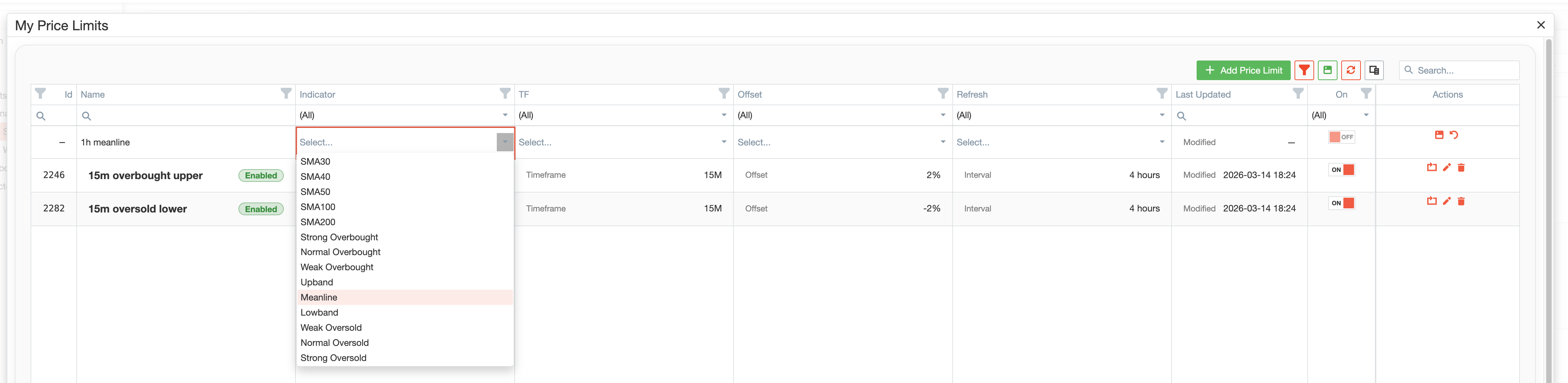
The goal is to prepare a reusable rule that can later be attached to a strategy.
Enable, disable, and clone
Rules can be managed without rebuilding them from scratch every time.
Users can:
- enable a rule when it should be active;
- disable a rule without deleting it;
- clone a rule to create a similar version more quickly;
- edit a rule later if the strategy setup changes.
This works well for testing and maintaining several similar approaches.
Main actions
The section supports the actions users usually need for reusable setup elements.
Users can:
- create a new rule;
- edit an existing rule;
- enable or disable a rule;
- clone a rule;
- delete a rule;
- search and filter the list;
- save their preferred table layout.
How Price Limits are used in strategies
Price Limits are designed to be selected later in Trade Strategies.
A strategy can use a prepared price-boundary rule instead of requiring the user to rebuild the same logic inside every strategy.
For users, the benefits are clear:
- strategy setup becomes cleaner;
- rule logic becomes easier to reuse;
- price-boundary conditions become easier to maintain.
Typical workflow
A typical workflow looks like this:
- Open Price Limits.
- Create a new rule with a clear name.
- Select the indicator, timeframe, offset, and refresh interval.
- Save the rule.
- Enable it when needed.
- Go to Trade Strategies and assign this rule to a strategy.
Summary
Use Price Limits when you want to manage price-boundary rules separately and reuse them across strategy setups.
The section makes price-limit rules a reusable and maintainable part of Futures configuration.