Clouds
What it is and how it is calculated
Firedrake Clouds is a trend indicator inspired by the Ichimoku cloud, reworked by Firedrake to suit fast crypto markets.
It is built from trailing lines that follow the price at different distances:
- a fast line (Tenkan) that stays close to the price;
- a medium line (Kijun);
- a slow line (Senkou B) that stays far from the price.
The distance of each line from the price adapts to volatility: in a calm market the lines stay closer, in a volatile one they keep more room. Like a trailing stop, a line moves only in the direction of the trend and holds its level when the price pulls back, until the trend breaks.
The space between the fast line and the slow line is the cloud you see on the chart (study Clouds (FireDrake)).
Cloud colour
- Blue — the faster part of the trend is above the slower part: the market is in an uptrend on this timeframe.
- Red — the faster part is below the slower part: a downtrend.
- Grey / Disabled in the terminal — not enough history yet (a new listing needs time to build it up).
The colour is decided on the previous closed candle and stays fixed for the whole current candle — it does not repaint. Because the colour reflects the overall structure of the lines, it can occasionally differ from what the two visible edges suggest for a candle or two during a trend change.
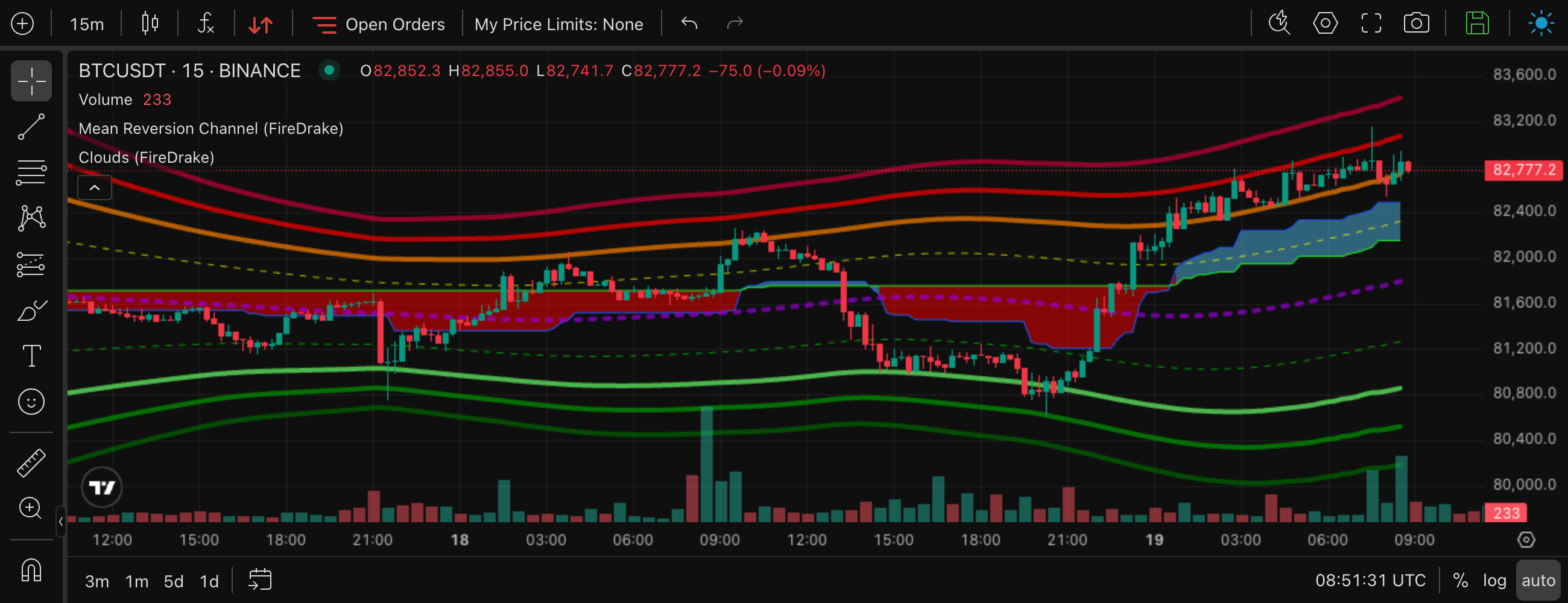
BTCUSDT, 15m. While the market moves sideways the cloud is red and the price keeps crossing it. After the breakout the cloud turns blue and the price rides above it — the cloud now works as support.
What it is for
- Trend direction. The colour tells you which side the market favours on each timeframe. Most traders take longs under a blue cloud and shorts under a red one, using a higher timeframe (1h, 4h) as the filter.
- Support and resistance. In an uptrend the blue cloud below the price acts as a support zone; in a downtrend the red cloud above the price acts as resistance. Returns to the cloud are typical places where a trend either continues or breaks.
- Trend change. A change of colour — and the price crossing the whole cloud — marks a possible reversal.
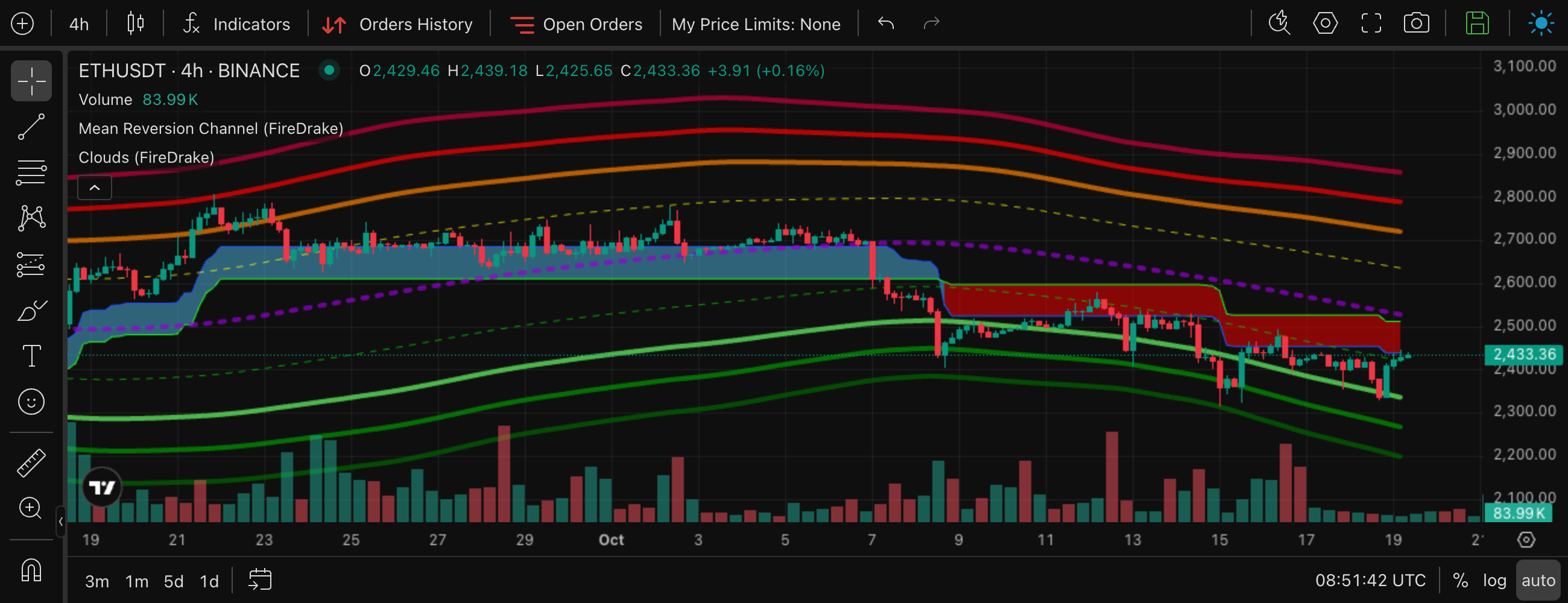
ETHUSDT, 4h. The price breaks down through the blue cloud, the cloud turns red, and from then on every rebound stops at the red cloud from below.
How to use it
In the screener and in strategies you choose, for each timeframe, Blue, Red or Disabled. Disabled means the colour is not checked on that timeframe. A contract whose cloud is not available yet (grey) never matches a Blue or Red condition.
Typical settings
| Idea | Setting |
|---|---|
| Longs only in an uptrend | 1h cloud = Blue (or 4h = Blue for a slower filter) |
| Shorts only in a downtrend | 1h cloud = Red |
| Strong trend agreement | 15m, 1h and 4h clouds all Blue |
| Early reversal hunting | 15m = Blue while 4h = Red — the lower timeframe has already turned |
Higher-timeframe cloud on the chart
The study Clouds MTF (FireDrake) shows the cloud of a higher timeframe on top of the chart — for example the 1h or 4h cloud on a 5m or 15m chart. This is exactly the trend filter from the table above, visible right on the chart you trade from, without switching timeframes.
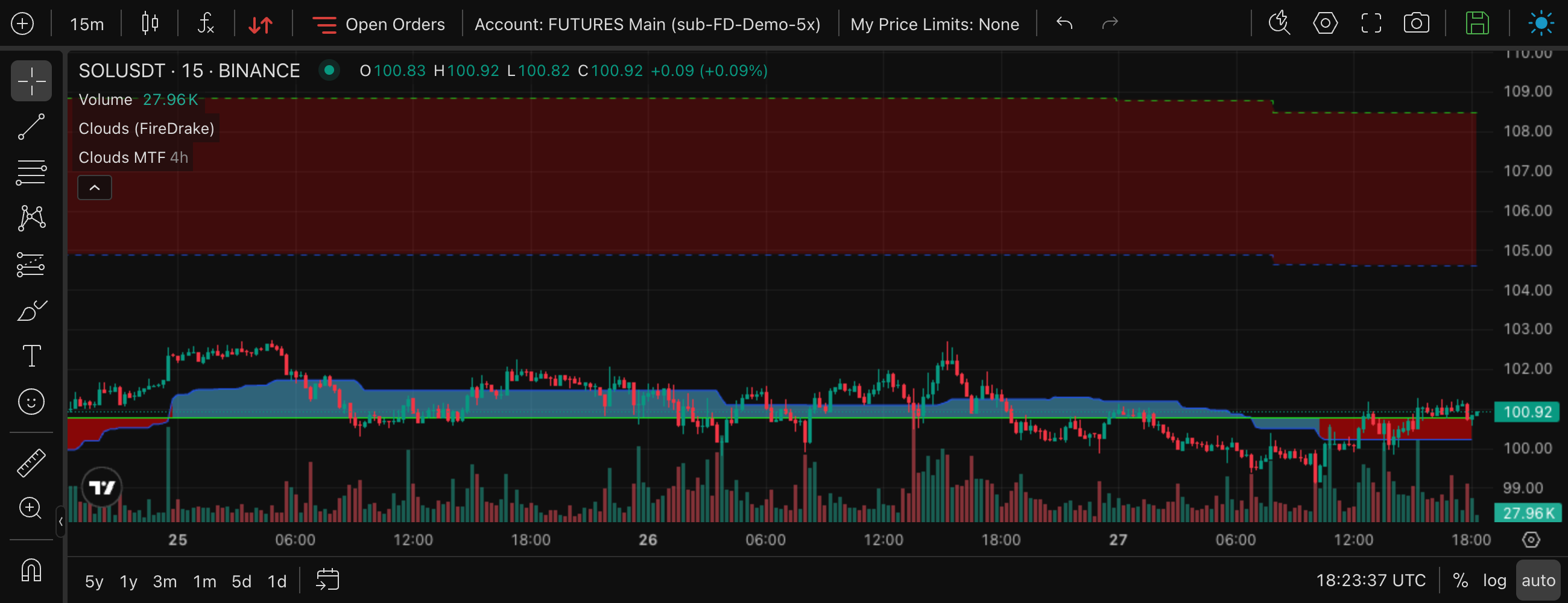
A 15m chart with its own cloud and the 4h cloud on top (lighter, with dashed edges).
- Add it from Indicators on the chart — new charts do not have it by default. See TradingView chart.
- Choose the timeframe in the study settings, on the Inputs tab: Timeframe (higher than the chart's), from 5 minutes to 1 week, 4 hours by default. It must be higher than the chart's timeframe, otherwise the study draws nothing. The 1 day and 1 week options match the 1d and 1w clouds of the screener and the strategies.
- The cloud is blue or red as usual, but lighter than the chart's own cloud; its edges (Tenkan-Sen and Senkou Span B) are dashed.
- Each candle of the higher timeframe is drawn as one flat segment, so the cloud looks like steps and can stay a flat band for a long time. While the current higher-timeframe candle is open, its edges can still adjust; its colour is fixed for the whole candle.
Going further: phase, width and the price position
The colour alone does not tell you how mature a trend is or where the price is relative to the cloud. Firedrake adds four classifications for that — see Market regime:
- Price vs cloud — above, inside or below the cloud right now;
- Cloud phase — a thin cloud is young or fading and changes colour more often; an established cloud belongs to a steady trend;
- Cloud width and MRC width — how wide they are compared with their usual width.
For example, the condition "cloud Blue + phase Established + price Above cloud" describes a calm, well-formed uptrend, while "cloud Blue + phase Thin" describes a trend that has only just started — or is about to end.
Combinations
- Blue cloud on 1h + oversold MRC zone on 15m — buy a dip in an uptrend. See MRC.
- Blue cloud + SMA9 Up on the same timeframe — the price moves with the trend right now. See SMA9.
- Higher-timeframe cloud on the chart + entry timing on the lower one. On a 15m chart with the 4h cloud on top (Clouds MTF), take entries only on the side of the 4h trend.
- Red cloud on 4h as a "stop" filter for long strategies — no new longs while the bigger trend is down.
Ready-made screener filter sets: Monitoring in the Screener.