Dashboard
The Dashboard section is the reporting area of the Spot module.
Use it when you want to review the financial result of your spot activity without going through individual trades one by one.
The section contains three tabs:
- UnRealized PnL
- Realized PnL
- Total PnL
All values are displayed in USDT.
UnRealized PnL Tab
The UnRealized PnL tab shows the result for assets that are still being held.
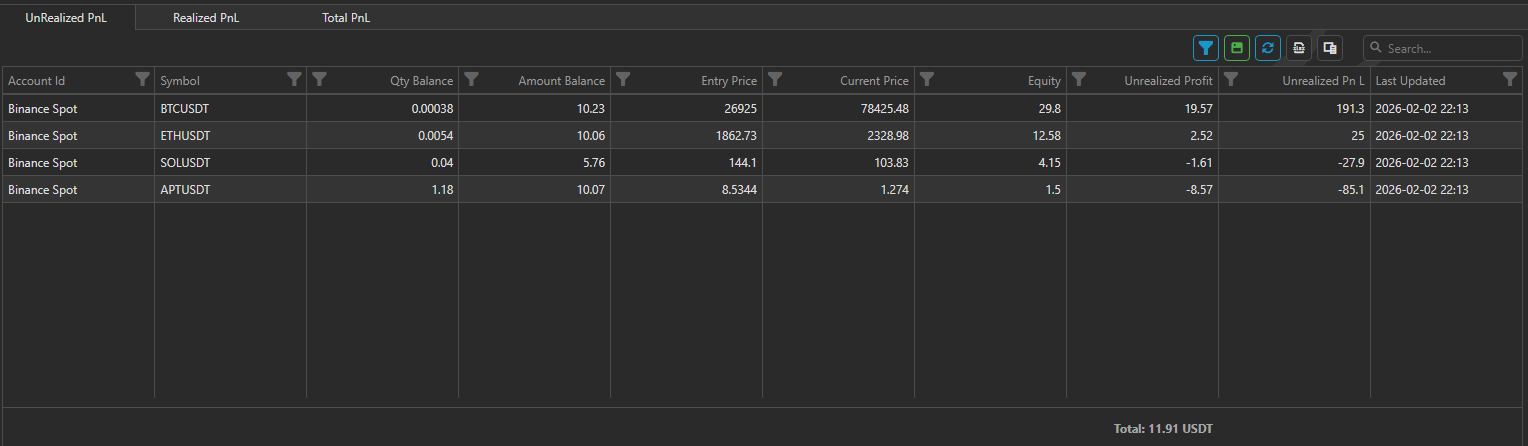
Use this tab when you want to understand:
- how current holdings are performing;
- which assets are currently in profit or drawdown;
- how much value is still on balance.
The report is organized by account and asset.
Realized PnL Tab
The Realized PnL tab shows the result for assets that have already been sold fully or partially.
This tab is useful when you want to review completed results rather than the value of holdings that are still open.
It helps answer questions such as:
- what has already been sold;
- what profit or loss has already been realized;
- how completed results compare across accounts.
Total PnL Tab
The Total PnL tab gives you a broader summary by account.

Use this tab when you want a higher-level view of spot performance, including both realized and unrealized parts of the result.
At the bottom of the report, the page also shows summary values such as totals and average PnL.
When to use the Dashboard
The Dashboard section is useful when you want to:
- review spot results by account;
- compare realized and unrealized performance;
- monitor portfolio performance over time;
- get a quick summary without opening individual trading screens.
This section is for analysis. It is not the page used to place trades or manage portfolio settings.